
No photos recorded for this color yet
Anker Nano USB-C Hub (10-in-1, 240Hz, Smart Display)
Product ID: AKS-20261018-X445
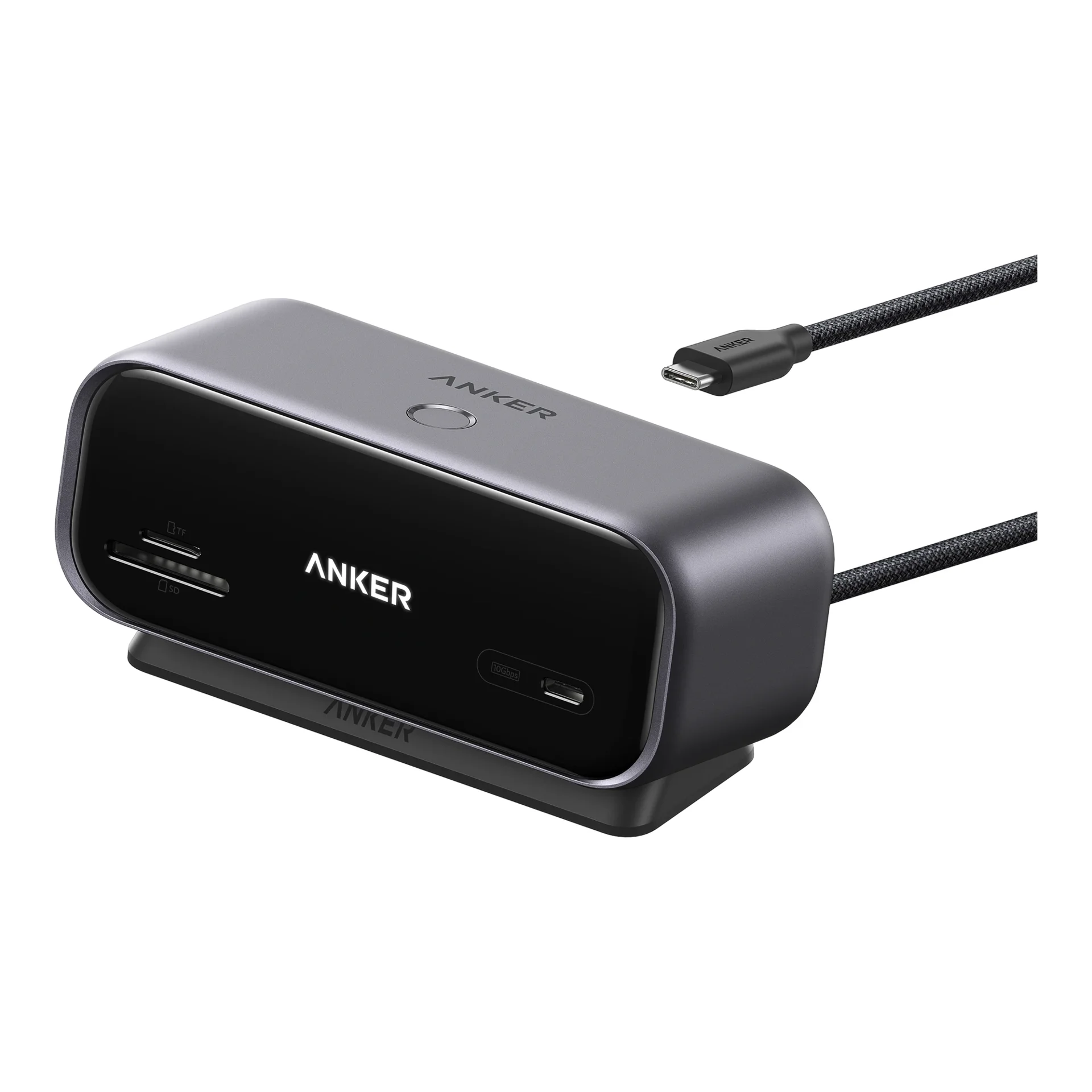
The Anker Nano USB-C Hub (10-in-1) is Anker's first USB-C hub with a built-in display: a 10-in-1 desktop hub whose screen shows live port status, charging power, transfer speed and temperature, and doubles as a photo frame or focus timer. HDMI 2.1 + DisplayPort 1.4 drive one monitor at up to 4K@144Hz or 2K@240Hz, and 100W PD-in gives up to 80W laptop charging (charger not included). Dual 2K@240Hz needs a laptop port with DP 2.1 and DSC, and macOS only mirrors two screens. 330g, US$99.99.
Saved temporarily in this device’s browser only. No long-term storage or syncing.
Official list prices
Pending and starting prices do not confirm the price of a specific variant. Check each market’s currency and tax status.
United States (US) · 1 USD 99.99
-
Verified
USD 99.99 US
Product price · Tax excluded
Official source · Checked
美國官方定價:$99.99
Product information
- Brand:
- Anker
- Category:
- Accessory
- Product line:
- Anker Nano
- Release date:
- 2026-10-06
- Product ID:
- AKS-20261018-X445
- Official information:
- View manufacturer page
- Last updated:
- Oct 31, 2026
GTIN barcodes
Usage notes · 5See highlighted labels beside specifications
Mac: mirrored displays
A210C cannot provide two independent external desktops on macOS.
Why: Anker attributes this to MST support, not a complete lack of Mac external-display support.
Conditions and sources
Applies to: macOS, with both external monitors connected through this A210C.
Alternative: Check the exact Mac and evaluate a separately verified setup; see the guide.
- Anker A210C:Compatibility、Notes 1 與雙螢幕 FAQ · Official
- Apple:依機型確認外接螢幕支援 · Official
Last checked (Taipei):
No USB-C video
Video uses HDMI/DisplayPort only. Front USB-C and USB-A are data-only; PD-IN is charger input.
Why: Connector shape does not establish function.
Conditions and sources
Applies to: A210C downstream USB and PD-IN ports.
Alternative: Check the monitor input before buying.
- Anker A210C:Notes 2、4 · Official
- Anker Japan:搭載ポート詳細/ご注意 · Official
Last checked (Taipei):
240Hz requirements
Anker specifies a host USB-C port with DP 2.1 and DSC 3:1.
Why: Video capability must be checked across the connection.
Conditions and sources
Applies to: The advertised A210C dual-2K/240Hz setup; macOS mirroring still applies.
Alternative: Verify computer, monitors and cables.
- Anker Japan:雙 2K/240Hz 主機條件 · Official
- VESA:DisplayPort over USB-C · Official
Last checked (Taipei):
Up to 80W to laptop
Host charging is up to 80W; the charger is separate. US guidance: 65W+. Japan: 100W+.
Why: The hub consumes power; regional guidance differs.
Conditions and sources
Applies to: A210C pass-through charging.
Alternative: Follow the documentation for your market and laptop.
- Anker Japan:100W 以上充電器建議 · Official
- Anker A210C:充電器 FAQ、100W 輸入/80W 主機供電 · Official
Last checked (Taipei):
No Linux support
Anker lists A210C as incompatible with Linux.
Why: OS compatibility and individual features are separate checks.
Conditions and sources
Applies to: A210C; not a test of every Linux distribution.
Alternative: Obtain explicit compatibility confirmation.
- Anker A210C:Compatibility · Official
Last checked (Taipei):
Specifications
Body
- Width
- 130 mm
- Height
- 55.6 mm
- Depth
- 50 mm
- Weight
- 330 g
- Accessory type
- USB-C hub (10-in-1, built-in smart display)
Battery & power
- Maximum single-port output
- 80 W
- Maximum input power
- 100 W
- Charging protocols
- USB Power Delivery (PD-IN up to 100W; up to 80W host charging)
Connectivity & compatibility
- Ports
- 1× HDMI 2.1, 1× DisplayPort 1.4, 1× USB-C PD-IN (100W max), 1× USB-C 10 Gbps data, 1× USB-A 10 Gbps data, 2× USB-A 5 Gbps, 1× Gigabit Ethernet, SD / microSD 3.0 card slots; built-in 700 mm (27.6-inch) USB-C host cable
- USB-C port count
- 2
- Built-in cable
- Yes
- Compatible platforms
- Windows 10 / 11, macOS (on macOS both external monitors mirror the same content; not compatible with Linux)
Explore more
Related insights
Explore the background, reports, and key observations behind this product.
Product reviews
Based on 4 reviews
Based on a limited sample of reviews.
Tech Spurt: Anker Nano USB-C Hub — Scorching 100W Heat & Annoying Short Cable
Machine translated · Original language: Chinese (Taiwan) · Source language: Chinese (Taiwan)
Source
Tech Spurt
Key Takeaways
- Spikes past 55°C surface heat under 100W PD pass-through and dual displays, raising concerns about component longevity.
- Stubby 15cm built-in cable leaves the hub dangling awkwardly in mid-air when your laptop is propped on a stand.
- Smart display status readouts suffer from sluggish refresh lag and are completely washed out in bright light.
- SD card slot is limited to slow UHS-I speeds, crawling through 4K video footage file transfers.
✅ Pros
- Compact 10-in-1 port versatility
- Supports high refresh rates up to 240Hz
- Cool real-time power wattage display
❌ Cons
- Dangerous 55°C surface heat under 100W load
- Stubby 15cm cable dangles awkwardly off stands
- Dim smart display unreadable in daylight
- Sluggish UHS-I speed limit on SD reader
📝 Verdict
"Anker Nano Hub packs great specs ruined by boiling 55°C surface heat and a frustratingly short cable."
View original
Tech Spurt:百瓦供電下機身高溫燙手,短小線材讓接口吊在半空
來源
Tech Spurt
重點摘要
- 當接入 100W PD 充電器並同時外接雙螢幕時,金屬機身表面溫度突破 55°C,觸摸時燙手令人擔憂內部晶片壽命。
- 內建的一體化 USB-C 連接線長度僅有 15 公分,插上筆電支架上的筆電時 Hub 只能懸空掛在半空中晃盪。
- 小螢幕顯示的即時瓦數與解析度刷新率資訊刷新延遲嚴重,且戶外日光下幾乎看不清數值。
- SD 卡槽讀寫速度僅達到 UHS-I 標準,傳輸 4K 影片大檔時速度緩慢耗時。
✅ 優點
- 外觀精緻便攜且接口多達 10 合 1
- 支援高達 240Hz 超高畫面更新率輸出
- 即時螢幕顯示供電瓦數具備科技感
❌ 缺點
- 滿載供電溫度高達 55°C 燙手
- 15 公分超短線材導致懸空晃盪
- 智慧小螢幕戶外反光看不清
- SD 卡槽僅為 UHS-I 慢速標準
📝 總結評語
「Anker Nano Hub 規格吸睛,但百瓦下的高溫燙手與短線吊在半空的尷尬,讓它實用體驗大打折扣。」
This AI-generated summary is based on the original source and was not written by its creator. It may contain errors or omissions; please consult the original source.
Mobile01: 240Hz display output and real-time power readouts! Testing the Anker Nano 10-in-1 smart hub
Machine translated · Original language: Chinese (Taiwan) · Source language: Chinese (Taiwan)
Review source
- Review article: 桌面工作者必備神物!Anker Nano USB-C 10-in-1 智慧螢幕集線器開箱實測
- Outlet: Mobile01 editorial team
Key takeaways
- Smart display monitoring: the built-in Smart Display shows each port's charging power, transfer status and current temperature in real time, making it both high-tech and practical.
- Top-tier video output: testing confirmed support for 4K@240Hz / 8K@60Hz video output, fully meeting the dual-monitor, high-frame-rate needs of esports gamers and professional video editors.
- Heat dissipation and power stability: under full 100W PD power delivery, the aluminum alloy shell dissipates heat well, and long file transfers showed no disconnects or overheating slowdowns.
✅ Pros
- Built-in smart display monitors power delivery and transfer data in real time
- Supports top-spec 4K 240Hz ultra-high-refresh-rate video output
- Plenty of ports (10-in-1) with solid thermal design and build
❌ Cons
- Priced higher than typical basic Type-C hubs
View original
Mobile01:240Hz 螢幕輸出與即時功率顯示!Anker Nano 10-in-1 智慧 Hub 實測
評測來源
- 評測文章:桌面工作者必備神物!Anker Nano USB-C 10-in-1 智慧螢幕集線器開箱實測
- 媒體:Mobile01 編輯部
核心觀點摘要
- 智慧螢幕監控:機身內建 Smart Display 即時顯示各連接埠充電功率、傳輸狀態與當前溫度,科技感與實用性十足。
- 頂級影像輸出:實測支援 4K@240Hz / 8K@60Hz 影像輸出,完美滿足電競玩家與專業剪輯師的雙螢幕高幀率需求。
- 散熱與供電穩定度:在 100W PD 滿載供電下,機身鋁合金外殼導熱良好,長時間傳輸檔案未見斷連或過熱降速。
✅ 優點
- 內建智慧螢幕即時監控供電與傳輸數據
- 支援頂規 4K 240Hz 超高更新率影音輸出
- 接口豐富(10-in-1)且散熱做工扎實
❌ 缺點
- 相較於一般基本款 Type-C Hub 定價偏高
This AI-generated summary is based on the original source and was not written by its creator. It may contain errors or omissions; please consult the original source.
Bytes & Bets: Just right for people who don't need Thunderbolt 5
Machine translated · Original language: Chinese (Taiwan)
Source
- Video: Anker Smart Display Hub Review: A USB-C Hub With a Screen?
- Channel: Bytes & Bets | Type: Professional review | Based on: YouTube transcript
Key points
- This video is sponsored by Anker, which provided the product; he also uses Anker products he paid for himself
- 10-in-1: SD/microSD and a USB-C data port on the front; HDMI, DisplayPort, Ethernet, three USB-A ports, the host connection and USB-C power input on the back
- All the connections worked in his tests; but there's only one USB-C data port
- According to the official specs, compatible hosts can drive a single 2K 240Hz or 4K 144Hz display, and Windows can extend to dual 4K 120Hz
- The screen shows charging, resolution and refresh rate, ports and temperature; a magnetic base on the bottom keeps it from moving when you plug and unplug
✅ Pros
- High-refresh-rate output
- Built-in status screen
- Full set of ports
- Compact and tidy
❌ Cons
- Only one USB-C data port
- Not a Thunderbolt dock
📝 Verdict
It isn't trying to be Anker's most powerful dock; for people who only need displays, networking, USB and a card reader, it's compact and distinctive and covers most everyday needs.
View original
Bytes & Bets:不需要 Thunderbolt 5 的人,這台剛好
來源
- 影片:Anker Smart Display Hub Review: A USB-C Hub With a Screen?
- 頻道:Bytes & Bets|類型:專業評測|摘要依據:YouTube 字幕逐字稿
重點摘要
- 本片由 Anker 贊助、提供產品;他平常也自費使用 Anker 產品
- 10 合 1:前方 SD/microSD 與 USB-C 資料埠;後方 HDMI、DisplayPort、乙太網路、三個 USB-A、主機連接與 USB-C 供電
- 實測各種連接都正常;但只有一個 USB-C 資料埠
- 依官方說明,相容主機可單螢幕 2K 240Hz 或 4K 144Hz,Windows 可雙 4K 120Hz 延伸
- 螢幕可看充電、解析度與更新率、連接埠與溫度;底部磁吸底座防止插拔時移動
✅ 優點
- 高更新率輸出
- 內建狀態螢幕
- 連接埠齊全
- 小巧整齊
❌ 缺點
- 只有一個 USB-C 資料埠
- 不是 Thunderbolt 擴充座
📝 總結評語
它不打算當 Anker 最強擴充座;只需要螢幕、網路、USB 與讀卡的人,這台小巧又有特色,涵蓋多數日常需求。
This AI-generated summary is based on the original source and was not written by its creator. It may contain errors or omissions; please consult the original source.
André Creates: A hub on your desk that talks back
Machine translated · Original language: Chinese (Taiwan)
Source
- Video: The Only Hub You Actually Need! - Anker Smart Display Hub
- Channel: André Creates | Type: User impressions | Based on: YouTube transcript
Key points
- This video is sponsored by Anker, which provided the product
- Most hubs don't tell you the actual charging wattage, transfer speed or whether they're overheating, and they often cap high-refresh-rate monitors at 60Hz
- It's smaller than the palm of a hand, and the design and screen animations feel premium
- An 80/20 cable layout: the always-connected HDMI, DP, Ethernet, power and data cables all run out the back, leaving the front for everyday uses like card reading
- In the past few weeks of testing, there was no thermal throttling, cursor lag or drive disconnects; he hopes for a future Thunderbolt 5 version
✅ Pros
- Supports 240Hz
- Real-time status screen
- Tidy cable layout
- Stable, doesn't overheat
❌ Cons
- Not Thunderbolt 5
📝 Verdict
If your desk is still using an opaque black-box hub that holds your monitor at 60Hz, this is a worthwhile upgrade.
View original
André Creates:桌面上會說話的 Hub
來源
- 影片:The Only Hub You Actually Need! - Anker Smart Display Hub
- 頻道:André Creates|類型:使用心得|摘要依據:YouTube 字幕逐字稿
重點摘要
- 本片由 Anker 贊助並提供產品
- 多數 Hub 不會告訴你實際充電瓦數、傳輸速度或是否過熱,而且常把高更新率螢幕限制在 60Hz
- 體積比手掌還小,外型與螢幕動畫很有質感
- 80/20 線材佈局:常駐的 HDMI、DP、乙太網路、供電與資料線都走後方,前方保留讀卡等日常用途
- 過去幾週測試中沒有過熱降速、游標延遲或硬碟斷線;他希望未來推出 Thunderbolt 5 版本
✅ 優點
- 支援 240Hz
- 即時狀態螢幕
- 整線佈局
- 穩定不過熱
❌ 缺點
- 不是 Thunderbolt 5
📝 總結評語
如果你的桌面還在用不透明的黑盒子 Hub、把螢幕卡在 60Hz,這台就是值得的升級。
This AI-generated summary is based on the original source and was not written by its creator. It may contain errors or omissions; please consult the original source.