
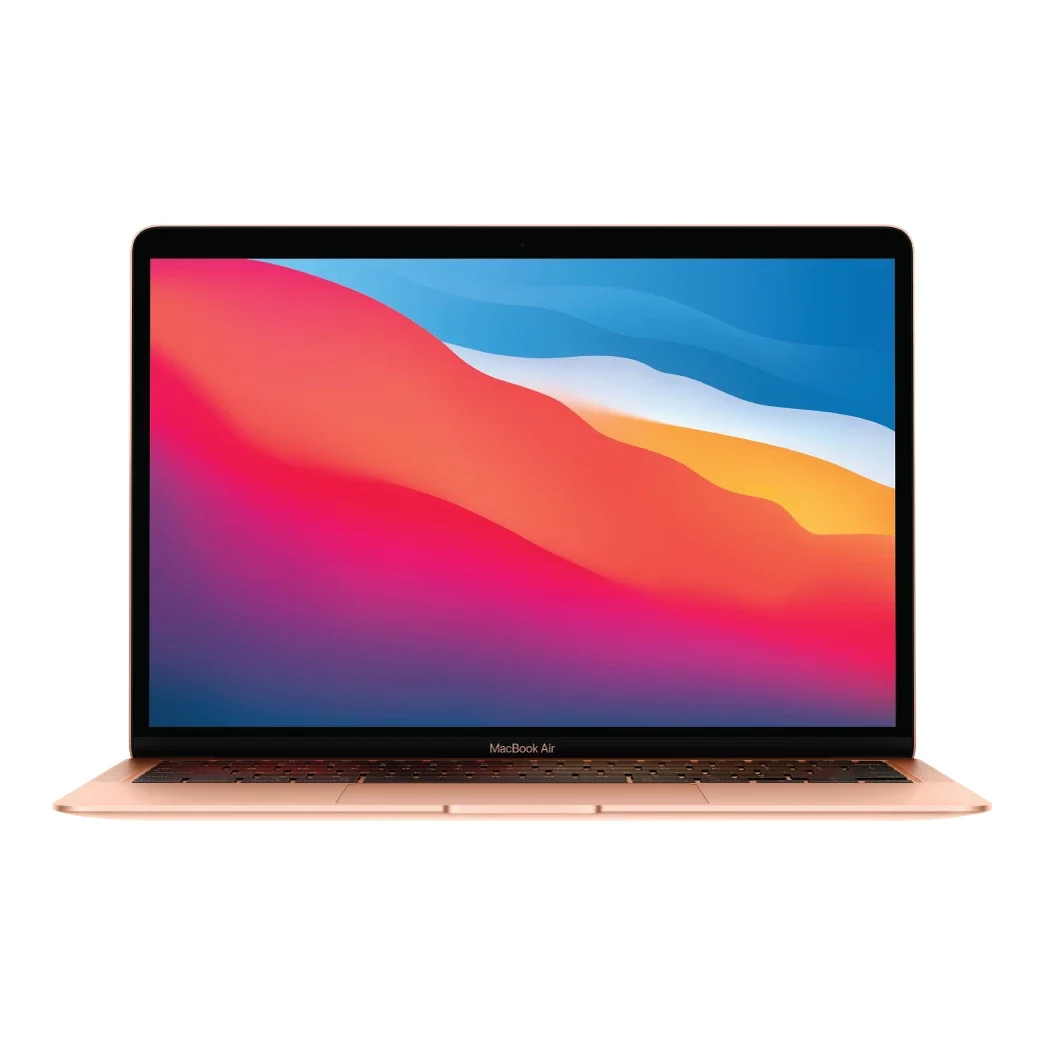
No photos recorded for this color yet
MacBook Air (M1, 2020)
Product ID: AKS-20261017-AQK2
The MacBook Air (M1, 2020) is one of the first Macs with Apple Silicon and the flagship of Apple's switch away from Intel; it remained a popular entry Mac for years. The M1 chip (8-core CPU) made this fanless laptop much faster and longer-lasting than the Intel model it replaced, rated at up to 18 hours of movie playback; Ars Technica described it as having 'that Apple Silicon magic.' It has a 13.3-inch Retina display, two Thunderbolt/USB 4 ports and a 49.9Wh battery, at 1.29kg. Unified memory starts at 8GB, and the launch base model had a 256GB SSD (the 128GB listed on Apple's current support page is a later lower-cost configuration). Discontinued.
Saved temporarily in this device’s browser only. No long-term storage or syncing.
Official list prices
Pending and starting prices do not confirm the price of a specific variant. Check each market’s currency and tax status.
No verified official price available
Product information
- Brand:
- Apple
- Category:
- Laptop
- Product line:
- MacBook Air
- Release date:
- 2020-11-17
- Product ID:
- AKS-20261017-AQK2
- Official information:
- View manufacturer page
- Last updated:
- Oct 29, 2026
Specifications
Body and display
- Width
- 304.1 mm
- Depth
- 212.4 mm
- Minimum height
- 4.1 mm
- Maximum height
- 16.1 mm
- Weight
- 1.29 kg
- Display count
- 1
- Display size
- 13.3 in
- Display resolution
- 2560 × 1600 (227 ppi)
- Display technology
- Retina LED-backlit IPS, P3 wide color, True Tone
- Refresh rate
- 60 Hz
- Touchscreen
- No
Performance and storage
- Operating system
- macOS
- OS version
- macOS Big Sur (at launch)
- Processor
- Apple M1 (8-core CPU: 4 performance + 4 efficiency)
- Graphics
- 7-core GPU (8-core option)
- NPU
- 16-core Neural Engine
- Memory
- 8 GB
- Memory type
- Unified memory (16GB option)
- Storage
- 256 GB
- Storage type
- SSD
- Upgradeable memory
- No
- Upgradeable storage
- No
Power and connectivity
- Battery capacity
- 49.9 Wh
- Power adapter
- 30 W
- Ports
- 2× Thunderbolt / USB 4 (USB-C), 3.5mm headphone jack
- Wireless
- Wi-Fi 6, Bluetooth 5.0
- Camera
- 720p FaceTime HD camera
- Color
- Gold, Silver, Space Gray
Display
- Peak brightness
- 400 nits
Product reviews
Based on 4 reviews
Based on a limited sample of reviews.
MKBHD: MacBook Air (M1, 2020) Review — Grainy 720p Webcam, Chunky Bezels, 1 External Monitor Cap
Machine translated · Original language: Chinese (Taiwan) · Source language: Chinese (Taiwan)
Source
Marques Brownlee (MKBHD)
Key Takeaways
- Reused the ancient 720p FaceTime webcam; video output is noisy, grainy, and washed out in modest indoor lighting.
- Chunky black aluminum display bezels look dated and cramped compared to modern bezel-less ultrabooks.
- Hardware architecture natively supports only a single external monitor, frustrating users wanting dual desktop displays.
- Only two Thunderbolt ports squished on the left flank; plugging in the charger leaves only one free port for peripherals.
✅ Pros
- Pioneering M1 architecture operates in absolute zero-decibel silence
- Classic iconic tapered wedge silhouette feels great in hand
- Marathon 15-hour casual battery life revolutionized laptops
❌ Cons
- Awful noisy 720p FaceTime webcam quality
- Thick dated display bezels
- Strict single external monitor hardware limit
- Port-starved with only two USB-C connectors
📝 Verdict
"M1 MacBook Air was a watershed tech triumph, aged gracefully despite thick bezels, bad webcams, and display limits."
View original
MKBHD:古老顆粒感 720p 視訊鏡頭,厚大邊框且原生僅支援一台外接螢幕
來源
Marques Brownlee (MKBHD)
重點摘要
- 沿用舊款模具的 720p FaceTime 鏡頭成像顆粒雜訊密佈,在室內光線稍弱時畫面塗抹嚴重宛如十年前畫質。
- 螢幕四周環繞著粗厚的黑色邊框,相較現代極窄邊框輕薄筆電在視覺上顯得相當過時侷促。
- 硬體架構層面原生僅支援外接單一獨立螢幕,需要多螢幕辦公的專業使用者必須依賴 DisplayLink 轉接卡。
- 僅在左側提供兩個 Thunderbolt 接口,插上充電線後僅剩一個接口,出門外接隨身碟與滑鼠極其捉襟見肘。
✅ 優點
- M1 晶片能效比劃時代突破完全無風扇靜音
- 經典楔形外觀單手抓取輕盈順手
- 日常網頁辦公續航輕鬆突破 15 小時
❌ 缺點
- 雜訊顆粒嚴重的 720p 劣質鏡頭
- 過時粗大的正面螢幕黑色邊框
- 原生僅支援連接一台外接顯示器
- 僅有兩個接口擴充性極端貧乏
📝 總結評語
「M1 MacBook Air 開啟了時代新篇章,但粗大邊框、爛鏡頭與單外接螢幕限制,承載著初代過渡的痕跡。」
This AI-generated summary is based on the original source and was not written by its creator. It may contain errors or omissions; please consult the original source.
Hardware Canucks after six months: The best computer I've ever owned
Machine translated · Original language: Chinese (Taiwan)
Source
- Video: Apple M1 MacBook Air - Long Term User Review
- Channel: Hardware Canucks | Type: Long-term review | Based on: YouTube transcript
Key points
- Dimitri used the base M1 MacBook Air for half a year and says it completely changed how he works, making it the best computer he's ever owned; his wife also likes that it's light enough to fit in her bag
- Over 200 video calls: the camera is still 720p, but the microphone quality is very good; the speakers' volume and punch put the Windows laptops he's used to shame, and the headphone output is clean with no noise floor
- The keyboard and trackpad are first-rate; two Thunderbolt 3 ports plus a hub are enough for him, but it only supports one external display
- Completely fanless and still quiet in Lightroom, DaVinci and Final Cut; the hinge opens with one hand and doesn't wobble while typing, and the 16:10 screen is the best at the thousand-dollar price point, though not as bright as the Pro's
- There's a clear gap between 8GB and 16GB in heavy multitasking; he thinks the base storage configuration is laughable, and those who want future-proofing should choose 16GB
✅ Pros
- Excellent value
- Fanless and silent
- Excellent speakers and microphones
- Light (1.3kg) and solidly built
❌ Cons
- 720p webcam
- Supports only one external display
- Base RAM/storage on the low side
📝 Verdict
After 6 months of use, he thinks it's the most complete portable computer US$1,000 can buy, with no major compromises.
View original
Hardware Canucks 半年長期使用:我擁有過最好的電腦
來源
- 影片:Apple M1 MacBook Air - Long Term User Review
- 頻道:Hardware Canucks|類型:長期使用評測|摘要依據:YouTube 字幕逐字稿
重點摘要
- Dimitri 用基本款 M1 MacBook Air 半年,稱它徹底改變了他的工作方式,是他擁有過最好的電腦;妻子也喜歡它輕到放得進包包
- 視訊通話超過 200 次:鏡頭仍是 720p,但麥克風品質很好;喇叭音量與力道讓他用過的 Windows 筆電相形見絀,耳機輸出乾淨無底噪
- 鍵盤與觸控板一流;兩個 Thunderbolt 3 埠搭配一個集線器對他足夠,但只能接一台外接螢幕
- 完全無風扇,在 Lightroom、DaVinci、Final Cut 下依然安靜;鉸鏈可單手開啟、打字不晃,16:10 螢幕在千元價位最好,只是亮度不如 Pro
- 8GB 與 16GB 在重度多工有明顯差距;他認為基本款儲存容量配置可笑,需要未來保障者應選 16GB
✅ 優點
- 性價比極高
- 無風扇靜音
- 喇叭與麥克風優秀
- 輕巧(1.3 公斤)、做工紮實
❌ 缺點
- 720p 視訊鏡頭
- 只支援一台外接螢幕
- 基本款 RAM/儲存偏少
📝 總結評語
使用 6 個月後,他認為這是 1,000 美元能買到最完整、沒有重大妥協的可攜電腦。
This AI-generated summary is based on the original source and was not written by its creator. It may contain errors or omissions; please consult the original source.
ShortCircuit unboxing: Great first impressions, with an experience "so seamless it's unremarkable"
Machine translated · Original language: Chinese (Taiwan)
Source
- Video: I’m impressed so far!! - Apple M1 MacBook Air
- Channel: ShortCircuit | Type: Unboxing first impressions | Based on: YouTube transcript
Key points
- Unboxing a 13.3-inch M1 MacBook Air with an 8-core CPU/8-core GPU, 16GB RAM and 512GB; RAM is only offered in 8 or 16GB because it's integrated in the same package
- The packaging is mostly paper, and a charger is still included; the exterior keeps the old design, and he had hoped Apple's first Apple Silicon machine would be bolder in industrial design
- He expects the most amazing thing about Apple Silicon Macs to be that most of the time "nothing feels different": even OBS, a non-native open-source recording app, just works
- The microphone array and speakers are impressive right out of the box; the screen is about 400 nits and still not HDR
- He complains that True Tone is always on by default and has to be turned off manually every time; full performance testing is left to the main Linus Tech Tips channel
✅ Pros
- Seamless compatibility
- Excellent speakers and microphones
- Eco-friendly packaging, charger included
❌ Cons
- Exterior keeps the old design
- Screen isn't HDR
- Only unboxing first impressions
📝 Verdict
So far everything has been seamless, and his first impressions are very good.
View original
ShortCircuit 開箱:初步印象很好,體驗『無縫到不起眼』
來源
- 影片:I’m impressed so far!! - Apple M1 MacBook Air
- 頻道:ShortCircuit|類型:開箱初體驗|摘要依據:YouTube 字幕逐字稿
重點摘要
- 開箱 8 核 CPU/8 核 GPU、16GB RAM、512GB 的 13.3 吋 M1 MacBook Air;RAM 只有 8 或 16GB 可選,因為整合在同一封裝
- 包裝多為紙材、仍附充電器;外觀沿用舊款設計,他原本希望 Apple 第一代 Apple Silicon 機種在工業設計上更大膽
- 他預期 Apple Silicon Mac 最驚人之處就是大部分時間『體驗毫無異樣』:連 OBS 這種非原生的開源錄影軟體也直接可用
- 麥克風陣列與喇叭開箱即令人印象深刻;螢幕約 400 nits,仍非 HDR
- 他抱怨 True Tone 總是預設開啟、每次都得手動關閉;完整效能測試留給 Linus Tech Tips 主頻道
✅ 優點
- 相容性無縫
- 喇叭與麥克風出色
- 環保包裝、附充電器
❌ 缺點
- 外觀沿用舊設計
- 螢幕非 HDR
- 僅開箱初步印象
📝 總結評語
到目前為止一切都很無縫,初步印象很好。
This AI-generated summary is based on the original source and was not written by its creator. It may contain errors or omissions; please consult the original source.
The Verge: M1 makes the MacBook Air the most impressive laptop in years
Machine translated · Original language: Chinese (Taiwan)
Source
- Video: M1 MacBook Pro and Air review: Apple delivers
- Channel: The Verge | Type: Professional review | Based on: YouTube transcript
Key points
- It looks exactly like the previous generation and still starts at US$999 (8GB); the review unit is the US$1,650 16GB/1TB version; the video also reviews the M1 MacBook Pro 13 and describes the Pro as "an Air with a fan"
- Dieter says this fanless Air is the most impressive laptop he's used in years: no matter how many apps he has open, he has no performance complaints at all
- Through Rosetta 2, apps designed for Intel also run smoothly, completely unlike the emulation experience on Windows on ARM
- Running iPhone/iPad apps on the Mac, however, feels half-baked: the HBO Max window can't be resized or go full screen, Telegram notifications jump to the foreground, and "Touch Alternatives" is absurd
- The only real downside is that Apple still uses a poor webcam; the same price gets a big boost in performance and battery life
✅ Pros
- Huge leap in M1 performance
- Fanless and quiet
- Significantly better battery life
- Good Rosetta 2 compatibility
- Unchanged price
❌ Cons
- Poor webcam
- iOS apps on the Mac feel half-baked
📝 Verdict
Apple exceeded expectations and got almost everything right in this transition except iOS apps; they even say "it could have been a 10."
View original
The Verge:M1 讓 MacBook Air 成為多年來最令人驚豔的筆電
來源
- 影片:M1 MacBook Pro and Air review: Apple delivers
- 頻道:The Verge|類型:專業評測|摘要依據:YouTube 字幕逐字稿
重點摘要
- 外觀與上一代完全相同,起價仍是 999 美元(8GB),評測機為 16GB/1TB 的 1,650 美元版本;影片同時評測 M1 MacBook Pro 13,並形容 Pro 是『有風扇的 Air』
- Dieter 說這台無風扇的 Air 是他多年來用過最令人驚豔的筆電:不論同時開多少 App 都沒有任何效能抱怨
- 透過 Rosetta 2,為 Intel 設計的 App 也能順暢執行,與 Windows on ARM 的模擬體驗截然不同
- 在 Mac 上跑 iPhone/iPad App 則很半成品:HBO Max 視窗無法調整大小或全螢幕、Telegram 通知會跳到前景、『觸控替代方案』很荒謬
- 唯一真正的缺點是 Apple 依舊使用很差的視訊鏡頭;同樣價格換來大幅效能與續航提升
✅ 優點
- M1 效能大躍進
- 無風扇且安靜
- 續航顯著提升
- Rosetta 2 相容性佳
- 價格不變
❌ 缺點
- 視訊鏡頭很差
- iOS App 在 Mac 上體驗半成品
📝 總結評語
Apple 超出預期,這次轉換除了 iOS App 外幾乎全都對了;他們甚至說『本來可以是 10 分』。
This AI-generated summary is based on the original source and was not written by its creator. It may contain errors or omissions; please consult the original source.