
No photos recorded for this color yet
Framework Laptop 13 (AMD Ryzen AI 300)
Product ID: AKS-20261013-QEAY
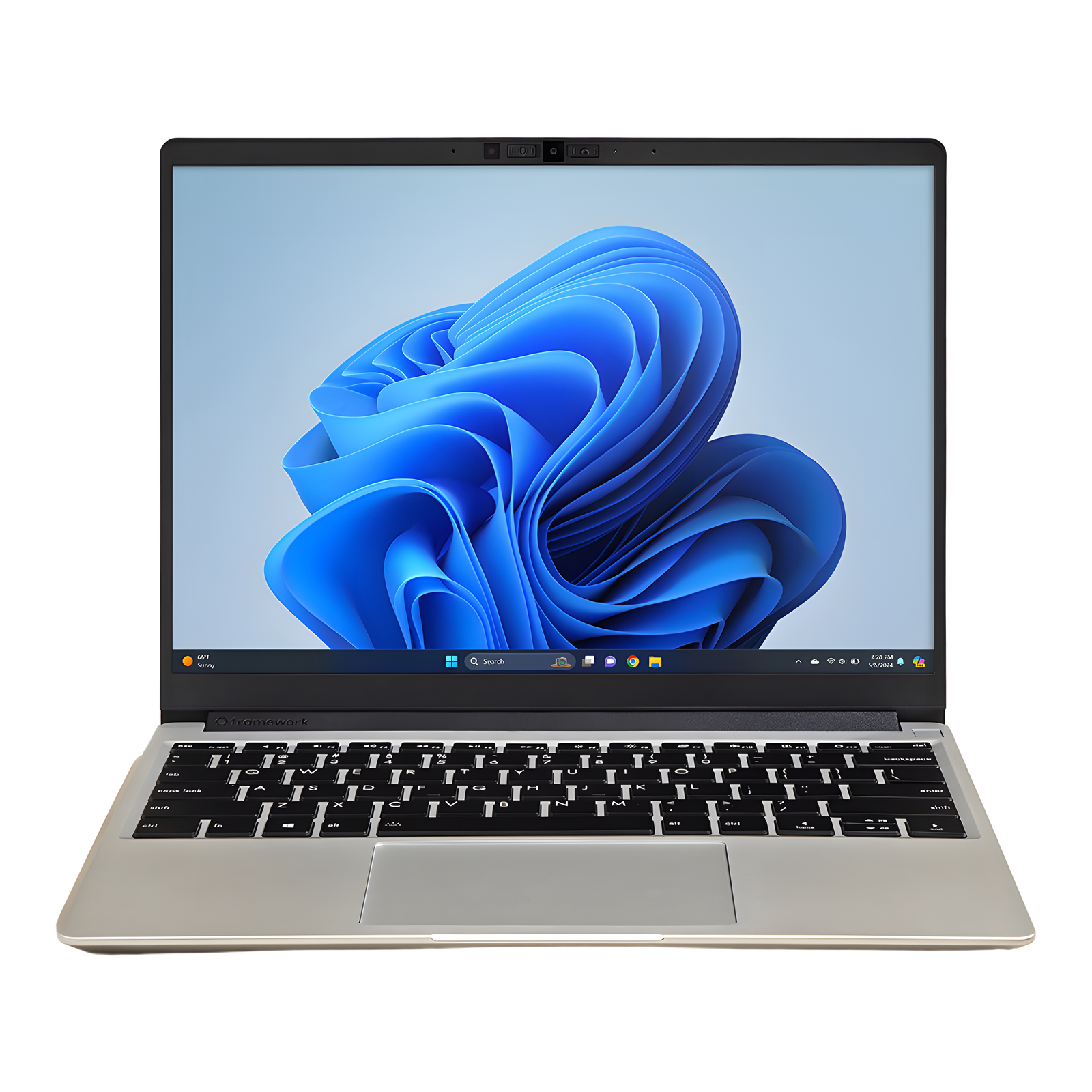
The Framework Laptop 13 (AMD Ryzen AI 300) is the modular 13-inch laptop built to be repaired and upgraded, at about 1.3kg, with a DIY Edition to assemble yourself. The 2025 update brings AMD Ryzen AI 300 chips (Ryzen AI 5 340 / 7 350 / 9 HX 370), a 13.5-inch 120Hz 3:2 display, a 61Wh battery and Wi-Fi 7. The SSD, battery and mainboard are user-replaceable, DDR5-5600 SO-DIMM goes up to 96GB, and four expansion-card bays let you pick USB-C, USB-A, HDMI and more. Downsides: speakers and battery life trail mainstream laptops at the price.
Saved temporarily in this device’s browser only. No long-term storage or syncing.
Official list prices
Pending and starting prices do not confirm the price of a specific variant. Check each market’s currency and tax status.
No verified official price available
Product information
- Brand:
- Framework
- Category:
- Laptop
- Product line:
- Framework Laptop 13
- Release date:
- 2025-04-18
- Product ID:
- AKS-20261013-QEAY
- Official information:
- View manufacturer page
- Last updated:
- Oct 29, 2026
Specifications
Body and display
- Width
- 296.63 mm
- Depth
- 228.98 mm
- Minimum height
- 15.85 mm
- Maximum height
- 15.85 mm
- Weight
- 1.3 kg
- Display count
- 1
- Display size
- 13.5 in
- Display resolution
- 2880 × 1920 (3:2)
- Display technology
- 13.5-inch IPS (120Hz, matte)
- Refresh rate
- 120 Hz
- Touchscreen
- No
Performance and storage
- Operating system
- Windows
- OS version
- 11 Home / Pro, or DIY Edition with your own OS (Linux supported)
- Processor
- AMD Ryzen AI 5 340 / Ryzen AI 7 350 / Ryzen AI 9 HX 370
- Graphics
- AMD Radeon 840M / 860M / 890M (integrated)
- NPU
- AMD XDNA 2 NPU, up to 50 TOPS
- Memory
- 96 GB
- Memory type
- DDR5-5600, 2× SO-DIMM (upgradeable, up to 96GB)
- Storage type
- M.2 2280 PCIe 4.0 NVMe (user-replaceable)
Power and connectivity
- Battery capacity
- 61 Wh
- Ports
- 4× expansion card bays (USB-C, USB-A, HDMI, DisplayPort, Ethernet, microSD and more) + 3.5mm combo jack
- Wireless
- Wi-Fi 7 (AMD RZ717)
- Camera
- 1080p 30fps (OmniVision OV08X 9.2MP sensor, 87° FOV), hardware privacy switch
Product reviews
Based on 4 reviews
Based on a limited sample of reviews.
ShortCircuit: Framework Laptop 13 (Ryzen AI 300) — Fan Pitch, Hollow Speakers, Stiff Click
Machine translated · Original language: Chinese (Taiwan) · Source language: Chinese (Taiwan)
Source
ShortCircuit
Key Takeaways
- Under full CPU load, the single cooling fan emits an annoying high-frequency whistle that cuts across quiet offices.
- Integrated speakers remain hollow, muffled, and entirely devoid of bass, trailing far behind consumer ultrabooks.
- Physical diving-board trackpad click requires excessive force, causing index finger fatigue during prolonged mouse work.
- While the reinforced hinge is firmer, the display still bobs slightly when typing on bumpy trains or buses.
✅ Pros
- Gold standard repairability and swappable modular I/O cards
- AMD Ryzen AI provides huge efficiency gains and cool idle runs
- Crisp 2.8K 120Hz 3:2 aspect ratio productivity dream panel
❌ Cons
- Shrill, high-pitched fan noise under full load
- Tinny, hollow down-firing speaker acoustics
- Stiff mechanical touchpad actuation requires high force
- Screen still wobbles slightly on bumpy transport
📝 Verdict
"Framework 13 with AMD Ryzen AI is an eco-friendly triumph with minor rough edges in speaker sound and fan pitch."
View original
ShortCircuit:高負載下風扇尖銳嘯叫,揚聲器音質單薄且觸控板點擊偏硬
來源
ShortCircuit
重點摘要
- 雖然採用新一代 AMD 能效晶片,但在 CPU 全速運算時,單風扇會發出極具辨識度的高頻金屬嘯叫聲,在安靜辦公室中頗為刺耳。
- 內建揚聲器單元調校依然平庸單薄,聲音乾癟發悶且完全缺乏低頻下潛,音效表現與同價位 MacBook 差距巨大。
- 觸控板底部的實體微動按壓阻尼偏硬,長時間使用食指連續點擊容易產生手指疲勞,缺乏震動模擬觸感。
- 螢幕下轉軸阻尼雖有加強,但在劇烈搖晃環境(如高鐵或顛簸巴士)中打字螢幕依然有輕微晃動。
✅ 優點
- 可自由更換升級全機零件與客製化四個模組卡插槽
- AMD Ryzen AI 晶片運算能效大幅進步日常安靜
- 3:2 比例 2.8K 120Hz 螢幕生產力視野無可挑剔
❌ 缺點
- 全速滿載時單風扇尖銳嘯叫風噪
- 揚聲器音質單薄乾癟完全無低音
- 觸控板實體按鍵點擊生硬偏重
- 晃動車廂環境中轉軸仍有微晃
📝 總結評語
「Framework 13 AMD 版大幅邁進,但刺耳風扇聲與單薄音質,提醒你追求極致模組化仍須面對細節妥協。」
This AI-generated summary is based on the original source and was not written by its creator. It may contain errors or omissions; please consult the original source.
Just Josh: From a developer's perspective, Ryzen AI 300 makes the Framework 13 cooler, quieter and faster, and modularity remains its biggest value
Machine translated · Original language: Chinese (Taiwan)
Source
- Video: Is the Framework 13 (2025) Worth the $$$? Dev’s Perspective
- Channel: Just Josh | Type: Review | Based on: YouTube transcript
Key points
- Every Framework part can be upgraded, and the company really does keep releasing new mainboards, screens and ports.
- The new panel is bright and matte with no reflections, suited to bright environments.
- It only gets slightly warm in daily use, and fan noise is lower than the previous model.
- Plugged-in performance has improved noticeably, but the gap narrows when running heavy loads unplugged.
- From his ten years of development experience, the reviewer would like a bigger screen for coding, though the 3:2 aspect ratio already helps.
✅ Pros
- Fully upgradable and repairable
- Bright matte screen
- Cooler and quieter
- Improved performance
❌ Cons
- Performance drops under heavy load when unplugged
- 13.5 inches is on the small side for coding
- Not cheap
📝 Verdict
Worth considering, especially for users who value long-term upgrades and repairs.
View original
Just Josh:從開發者角度看,Ryzen AI 300 讓 Framework 13 更涼、更安靜、更快,模組化依然是最大價值
來源
- 影片:Is the Framework 13 (2025) Worth the $$$? Dev’s Perspective
- 頻道:Just Josh|類型:評測|摘要依據:YouTube 字幕逐字稿
重點摘要
- Framework 的每個零件都能升級,且官方真的持續推出新主機板、螢幕與連接埠。
- 新面板亮度高且霧面不反光,適合明亮環境。
- 日常使用只微溫,風扇噪音比前代更低。
- 插電效能進步明顯,但不插電跑高負載時差距縮小。
- 作者以十年開發經驗來看,寫程式更想要大一點的螢幕,雖然 3:2 比例已有幫助。
✅ 優點
- 完全可升級維修
- 霧面高亮度螢幕
- 更涼更安靜
- 效能提升
❌ 缺點
- 不插電高負載效能下降
- 13.5 吋對寫程式偏小
- 價格不低
📝 總結評語
值得考慮,尤其是重視長期升級維修的使用者。
This AI-generated summary is based on the original source and was not written by its creator. It may contain errors or omissions; please consult the original source.
Matthew Moniz: The 2025 Framework 13 (Ryzen AI 300) is repairable and upgradable, but its specs trail rivals at the same price
Machine translated · Original language: Chinese (Taiwan)
Source
- Video: 2025 Framework Laptop 13 - Repairable. Customizable. Overpriced?
- Channel: Matthew Moniz | Type: Review | Based on: YouTube transcript
Key points
- The DIY Edition goes up to the Ryzen AI 9 HX 370; the reviewer's configuration with 32GB, 1TB and 2.8K IPS came to just over US$2,000.
- The same money buys a 24GB MacBook Pro 14, or a cheaper 32GB MacBook Air 13.
- You install the RAM (up to 96GB), bezel, keyboard and expansion cards yourself: two USB4 USB-C, one USB-A and one HDMI.
- The 2.8K screen is sharp with good color accuracy but an average color gamut; the look is clean, with no brand stickers.
- The HX 370 is about 37% slower in single-core than the M4 MacBook Air, but about 27% better than Lunar Lake and Snapdragon X Elite; the Radeon 890M integrated graphics are surprisingly strong.
✅ Pros
- Repairable and upgradable
- Strong Radeon 890M integrated graphics
- Choose your own ports
❌ Cons
- Specs and screen trail rivals at the same price
- Average color gamut
- On the expensive side
📝 Verdict
If you plan to use one laptop for 5–10 years and replace parts gradually, this is the right choice; the high price is the cost of freedom.
View original
Matthew Moniz:2025 Framework 13(Ryzen AI 300)可修可升級,但同價位規格不如對手
來源
- 影片:2025 Framework Laptop 13 - Repairable. Customizable. Overpriced?
- 頻道:Matthew Moniz|類型:評測|摘要依據:YouTube 字幕逐字稿
重點摘要
- DIY 版最高可選 Ryzen AI 9 HX 370;作者配置 32GB、1TB、2.8K IPS,總價略高於 2,000 美元。
- 同價可買 24GB 的 MacBook Pro 14,或更便宜的 32GB MacBook Air 13。
- 自行安裝 RAM(最高 96GB)、邊框、鍵盤與擴充卡:兩個 USB4 USB-C、一個 USB-A、一個 HDMI。
- 2.8K 螢幕清晰、色準不錯但色域普通;外觀簡潔、沒有品牌貼紙。
- HX 370 單核比 M4 MacBook Air 慢約 37%,但比 Lunar Lake 與 Snapdragon X Elite 好約 27%;Radeon 890M 內顯出乎意料地強。
✅ 優點
- 可維修、可升級
- Radeon 890M 內顯強
- 接口可自選
❌ 缺點
- 同價位規格與螢幕不如對手
- 色域普通
- 價格偏高
📝 總結評語
若打算一台筆電用 5–10 年並逐步更換零件,這是正確選擇;貴,是為自由付出的代價。
This AI-generated summary is based on the original source and was not written by its creator. It may contain errors or omissions; please consult the original source.
ShortCircuit: The Ryzen AI 9 HX 370 DIY Edition is unmatched for repairs and upgrades, but battery life and overall polish trail typical laptops
Machine translated · Original language: Chinese (Taiwan)
Source
- Video: This Laptop IS Available in America (for now) - Framework Laptop 13" Ryzen AI 9 DIY
- Channel: ShortCircuit | Type: Review (Ryzen AI 9 HX 370 DIY Edition) | Based on: YouTube transcript
Key points
- Because of tariffs, shipments of some base models to the US were briefly paused and later resumed; higher-end models were unaffected.
- Configured with a purple bezel and the new 2.8K 120Hz matte screen; disassembly only requires loosening the bottom screws.
- The battery test result would have been good two years ago, but it loses to a comparison machine with Intel's new power-efficient processor.
- The touchpad is fine; the screen isn't a highlight.
- Heavy games are only barely playable with FSR on; the webcam is usable but not outstanding.
✅ Pros
- Unmatched repairability and upgradability
- Modular ports
- 2.8K 120Hz matte screen
❌ Cons
- Battery life loses to rivals in its class
- Average webcam
- Overall polish trails typical laptops
📝 Verdict
If you want to repair and upgrade it yourself, nothing on the market competes; for people who just want a complete experience and replace it when it breaks, it's not the best value.
View original
ShortCircuit:Ryzen AI 9 HX 370 DIY 版,維修升級無可取代,但續航與整體完成度不如一般筆電
來源
- 影片:This Laptop IS Available in America (for now) - Framework Laptop 13" Ryzen AI 9 DIY
- 頻道:ShortCircuit|類型:評測(Ryzen AI 9 HX 370 DIY 版)|摘要依據:YouTube 字幕逐字稿
重點摘要
- 受關稅影響,部分基本款一度暫停出貨美國,之後又恢復;高階款不受影響。
- 搭配紫色邊框與新的 2.8K 120Hz 霧面螢幕;拆機只需鬆開底部螺絲。
- 續航測試結果放在兩年前算不錯,但輸給 Intel 新一代省電處理器的對照機。
- 觸控板沒問題;螢幕表現不算亮點。
- 重度遊戲需開 FSR 才勉強可玩;鏡頭堪用但不出色。
✅ 優點
- 維修與升級無可取代
- 模組化連接埠
- 2.8K 120Hz 霧面螢幕
❌ 缺點
- 續航輸給同級對手
- 鏡頭普通
- 整體完成度不如一般筆電
📝 總結評語
要可自行維修升級,市場上沒有對手;只想要完整體驗、用壞就換的人,CP 值不是最高。
This AI-generated summary is based on the original source and was not written by its creator. It may contain errors or omissions; please consult the original source.