
No photos recorded for this color yet
ASUS ROG Zephyrus Duo (2026, GX651)
Product ID: AKS-20261011-6AG9
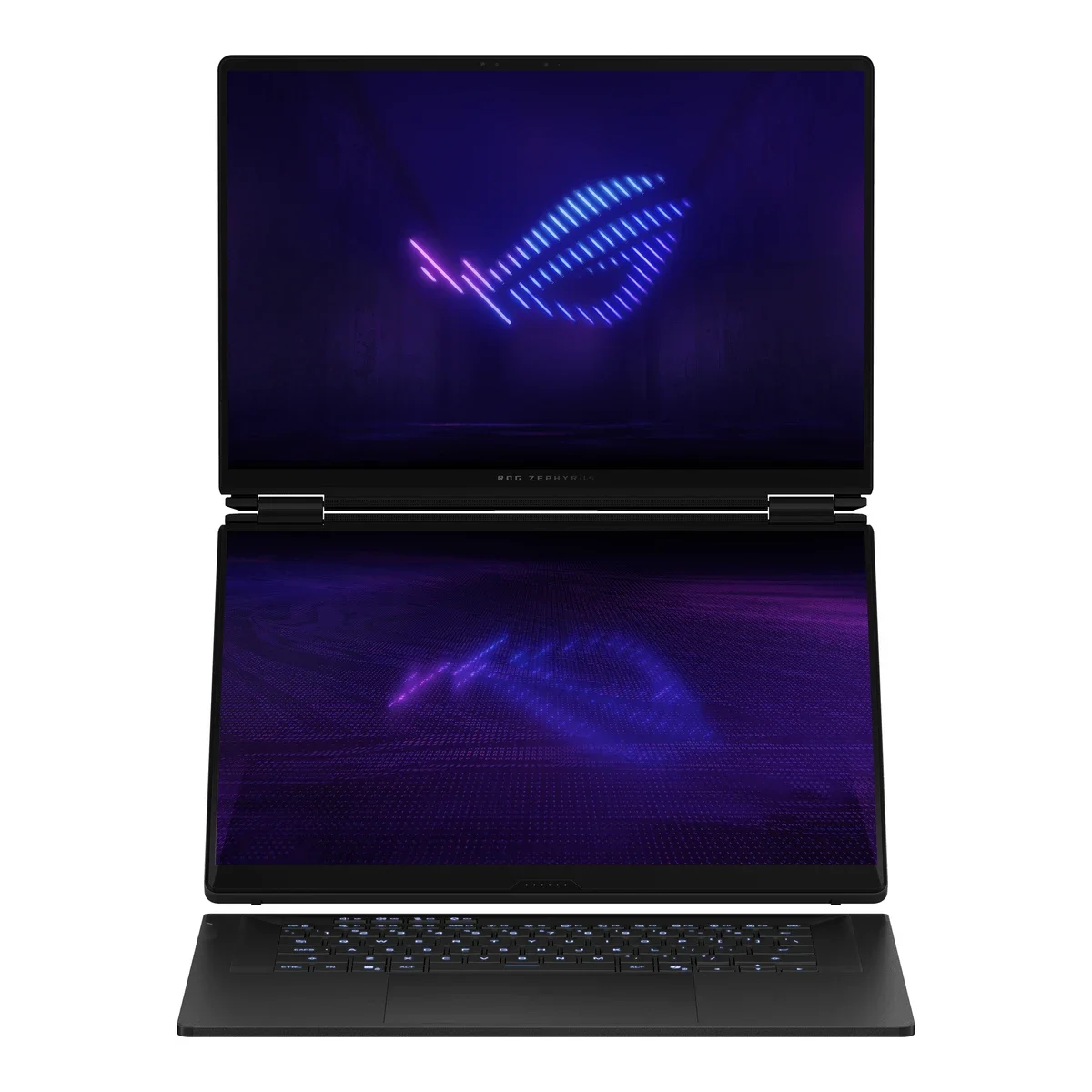
The ASUS ROG Zephyrus Duo (2026, GX651) returns in an all-new form: two stacked 16-inch 3K 120Hz OLED touchscreens with a detachable magnetic keyboard and rear kickstand, supporting laptop, dual-screen, tent and book modes plus stylus input. The Taiwan launch model packs an Intel Core Ultra 9 386H, RTX 5090 Laptop GPU (24GB GDDR7), 64GB LPDDR5X and a 2TB PCIe 5.0 SSD, with a 90Wh battery and 250W adapter. The CNC-aluminum chassis is 1.99–2.49cm thick and 2.82kg, with dual Thunderbolt 4, dual USB-A, HDMI 2.1 and an SD reader. Taiwan pre-orders opened 2026-04-20 from NT$269,999. It is a niche machine for multitaskers, streamers and creators.
Saved temporarily in this device’s browser only. No long-term storage or syncing.
Official list prices
Pending and starting prices do not confirm the price of a specific variant. Check each market’s currency and tax status.
Taiwan (TW) · 1 TWD 269,999
-
Starting at
TWD 269,999 TW
Product price · Tax included
Official source · Checked
官方定價:NT$269,999 起
Product information
- Brand:
- ASUS
- Category:
- Laptop
- Product line:
- ROG Zephyrus
- Release date:
- 2026-04-17
- Product ID:
- AKS-20261011-6AG9
- Official information:
- View manufacturer page
- Last updated:
- Oct 31, 2026
Specifications
Body and display
- Width
- 355 mm
- Depth
- 247 mm
- Minimum height
- 19.9 mm
- Maximum height
- 24.9 mm
- Weight
- 2.82 kg
- Display count
- 2
- Display size
- 16 in
- Display resolution
- 2880 × 1800 (each of two screens)
- Display technology
- Dual ROG Nebula HDR OLED touchscreens 16:10 (3K, 120Hz, 0.2ms, G-Sync, Pantone Validated, 100% DCI-P3, stylus support)
- Refresh rate
- 120 Hz
- Touchscreen
- Yes
Performance and storage
- Operating system
- Windows
- OS version
- 11 Home
- Processor
- Intel Core Ultra 9 386H (16 cores, up to 4.9GHz, 18MB cache)
- Graphics
- NVIDIA GeForce RTX 5090 Laptop GPU 24GB GDDR7 (MUX Switch)
- NPU
- Intel NPU, up to 50 TOPS
- Memory
- 64 GB
- Memory type
- LPDDR5X-8533 onboard (not upgradeable)
- Storage
- 2,048 GB
- Storage type
- PCIe 5.0 NVMe M.2 Performance SSD (2× M.2 slots)
Power and connectivity
- Battery capacity
- 90 Wh
- Power adapter
- 250 W
- Ports
- 2× Thunderbolt 4 (40Gbps, DisplayPort / power delivery), 2× USB 3.2 Gen 2 Type-A, 1× HDMI 2.1 FRL, SD card reader (UHS-II), 1× 3.5mm audio jack
- Wireless
- Wi-Fi 7 (tri-band 2×2); Bluetooth 6.0
- Camera
- 1080p FHD IR camera (Windows Hello)
Product reviews
Based on 4 reviews
Based on a limited sample of reviews.
Dave2D: Zephyrus Duo (2026) Review — Zero Palm Rest, Blinding Glare, Dust Trap Hinge
Machine translated · Original language: Chinese (Taiwan) · Source language: Chinese (Taiwan)
Source
Dave2D
Key Takeaways
- Secondary ScreenPad Plus pushes the keyboard to the absolute bottom edge, leaving zero wrist rest and causing carpal fatigue.
- The tilted secondary display reflects overhead ceiling lights directly into your eyes, washing out UI panels.
- The gap under the lifted screen acts as a gaping dust and pet hair trap that is nearly impossible to vacuum out.
- Cramped vertical trackpad squished into the bottom right corner is clumsy to navigate and prone to mis-clicks.
✅ Pros
- Dual screens enable live streaming monitoring without alt-tabbing
- Uncompromising top-tier CPU and GPU power
- Raised display dramatically enhances cooling intake
❌ Cons
- Zero palm rest strains wrists and forearms
- Tilted screen catches blinding ceiling reflections
- Gap under screen is an un-cleanable dust vacuum
- Cramped, awkward vertical touchpad
📝 Verdict
"Zephyrus Duo offers sci-fi dual-screen glamour ruined by excruciating wrist ergonomics and dust traps."
View original
Dave2D:毫無掌托空間手腕懸空酸痛,副螢幕反光與易進灰塵的轉軸陷阱
來源
Dave2D
重點摘要
- 副螢幕將鍵盤強行推擠至機身最下端,完全沒有任何掌托空間,使用時手腕懸空敲擊半小時即關節酸痛。
- 傾斜抬升的副螢幕在室內吊燈照射下產生刺眼強烈反光,導致副螢幕內容經常看不清需手動遮光。
- 抬升機構下方形成的巨大散熱風道縫隙容易吸入毛髮、寵物毛皮與灰塵,內部極難清理清理難度極高。
- 右側窄小豎向排列的觸控板面積極度侷促,游標操作非常蹩腳且極易誤觸數字鍵盤切換。
✅ 優點
- 雙螢幕同步運作監控即時串流與遊戲資訊
- 頂級雙晶片性能狂暴釋放
- 副螢幕抬升大幅改善底部散熱進氣
❌ 缺點
- 完全無掌托手腕懸空疲勞疼痛
- 副螢幕反光刺眼干擾視線
- 抬升縫隙淪為灰塵毛髮收集器
- 右下角極小垂直觸控板難用
📝 總結評語
「Zephyrus Duo 雙螢幕概念迷人,但反人類的手腕人體工學與灰塵陷阱,讓它成為代價高昂的偏門玩具。」
This AI-generated summary is based on the original source and was not written by its creator. It may contain errors or omissions; please consult the original source.
Jarrod'sTech: The dual-screen Zephyrus Duo is a multitasking dream machine, but performance takes a hit and it's extremely expensive
Machine translated · Original language: Chinese (Taiwan)
Source
- Video: More Screens, More Problems - ASUS Zephyrus Duo 16 (2026) Review
- Channel: Jarrod'sTech | Type: Full review (RTX 5090) | Based on: YouTube transcript
Key points
- The CNC aluminum chassis is solid; it can be used in regular laptop, rear-kickstand dual-screen, sharing, tent and book modes, and his favorite is dual-screen mode, with the top screen close to eye level.
- There are many gestures and shortcuts: tap with six fingers to bring up a virtual keyboard, three fingers for a virtual touchpad, F12 to swap the contents of the two screens, and more.
- The machine weighs 2.8kg, or about 3.5kg with the 250W power adapter; the rubber feet on the back make it thicker in practice.
- Dual OLED touchscreens, battery life among the best he has tested, and good thermal performance.
- Performance trails other RTX 5090 laptops with the same specs; no Thunderbolt 5; soldered memory; Ubuntu crashes on boot.
- When tested at the end of May, the RTX 5070 Ti version started at US$4,500 and the tested 5090 version was about US$5,500, roughly US$2,500 more than other 5090 laptops.
✅ Pros
- Dual OLED touchscreens for efficient multitasking
- Excellent battery life
- Solid build, good thermals
- No competition right now
❌ Cons
- Slower than machines with the same specs
- On the heavy side
- Soldered memory, no Thunderbolt 5
- Extremely high price
📝 Verdict
A niche within a niche: gamers, streamers and creators for whom budget isn't an issue and who are willing to trade performance for a second screen will love it; if you want more performance for less money, buy something else.
View original
Jarrod'sTech:Zephyrus Duo 雙螢幕是多工夢想機,但效能打折又極貴
來源
- 影片:More Screens, More Problems - ASUS Zephyrus Duo 16 (2026) Review
- 頻道:Jarrod'sTech|類型:完整評測(RTX 5090)|摘要依據:YouTube 字幕逐字稿
重點摘要
- CNC 鋁合金機身扎實;可用一般筆電、背後支架雙螢幕、分享、帳篷與書本模式,他最喜歡雙螢幕模式,上方螢幕接近視線高度。
- 有多種手勢與快捷鍵:六指點出虛擬鍵盤、三指點出虛擬觸控板、F12 對調兩螢幕內容等。
- 機身 2.8kg、加 250W 變壓器約 3.5kg;背後橡膠腳讓機身實際更厚。
- 雙 OLED 觸控螢幕、續航是他測過最好的之一、散熱表現好。
- 同規格下效能不如其他 RTX 5090 筆電;沒有 Thunderbolt 5;記憶體焊死;Ubuntu 開機會當機。
- 5 月底測試時,RTX 5070 Ti 版 US$4,500 起、測試的 5090 版約 US$5,500,比其他 5090 筆電貴約 US$2,500。
✅ 優點
- 雙 OLED 觸控螢幕、多工效率高
- 續航極佳
- 做工扎實、散熱好
- 目前沒有競品
❌ 缺點
- 效能不如同規格機種
- 偏重
- 記憶體焊死、沒有 Thunderbolt 5
- 售價極高
📝 總結評語
利基中的利基:預算不是問題、又願意為第二個螢幕犧牲效能的玩家、直播主與創作者會很喜歡;想要更高效能、更便宜就買其他機。
This AI-generated summary is based on the original source and was not written by its creator. It may contain errors or omissions; please consult the original source.
Notebookcheck: The coolest laptop of 2026 that nobody can afford — the Zephyrus Duo nails the dual-screen concept
Machine translated · Original language: Chinese (Taiwan)
Source
- Video: The coolest laptop of 2026 nobody can afford! - Asus ROG Zephyrus Duo 2026
- Channel: NotebookcheckReviews | Type: Full review (Ultra 9 386H / RTX 5090 / 64GB / 2TB) | Based on: YouTube transcript
Key points
- He thinks this is the best high-end dual-screen laptop, and that ASUS executed the concept very well; it's more like a bigger, more powerful Zenbook Duo than a direct successor to the 2023 Duo.
- The Core Ultra 9 386H's multi-core performance regresses from the previous 16-core Ryzen HX, in exchange for lower temperatures, quieter operation and longer battery life; the RTX 5090 runs at 135W in Turbo mode and 150W in Manual.
- 64GB of memory and a 2TB SSD, plus one empty M.2 slot; other repairs require taking the whole machine apart.
- Both 2.8K 120Hz OLEDs support G-SYNC, with decent brightness.
- The fans are occasionally audible even under light use, especially with both screens on; the speakers aren't as good as the G16 / P16's.
- With a single screen at 115 nits, Wi-Fi browsing lasts about 14.5 hours, nearly 9 hours at maximum brightness, and over 10 hours even with both screens.
✅ Pros
- Complete execution of the dual-screen concept
- Very good battery life
- Full high-end specs
- Extra M.2 slot
❌ Cons
- Multi-core CPU regression
- Speakers trail other family members
- Fans occasionally spin up
- Extremely high price
📝 Verdict
If you need two screens, this is it: most people can do most things with a G16 plus an external monitor, but if you need one machine that does it all, the Duo executes it brilliantly.
View original
Notebookcheck:2026 年最酷但沒人買得起的筆電——Zephyrus Duo 把雙螢幕做到位
來源
- 影片:The coolest laptop of 2026 nobody can afford! - Asus ROG Zephyrus Duo 2026
- 頻道:NotebookcheckReviews|類型:完整評測(Ultra 9 386H/RTX 5090/64GB/2TB)|摘要依據:YouTube 字幕逐字稿
重點摘要
- 他認為這是最好的高階雙螢幕筆電,ASUS 把概念做得很到位;它更像放大、更強的 Zenbook Duo,而非 2023 Duo 的直接續作。
- Core Ultra 9 386H 的多核性能比前代 16 核 Ryzen HX 退步,換來更低溫、更安靜與更長續航;RTX 5090 渦輪模式 135W、手動 150W。
- 64GB 記憶體、2TB SSD,另有一個空的 M.2 插槽;其他維修需整機拆開。
- 兩片 2.8K 120Hz OLED 皆支援 G-SYNC,亮度不錯。
- 輕度使用時也偶爾聽到風扇,尤其兩個螢幕都開;喇叭不如 G16/P16。
- 單螢幕 115 尼特 Wi-Fi 上網約 14.5 小時、最高亮度近 9 小時,雙螢幕也超過 10 小時。
✅ 優點
- 雙螢幕概念實作完整
- 續航非常好
- 高階規格齊全
- 有額外 M.2 插槽
❌ 缺點
- 多核 CPU 退步
- 喇叭不如同家族
- 風扇偶爾會轉
- 價格極高
📝 總結評語
需要雙螢幕就是它:多數人用 G16 加外接螢幕就能做到大部分事,但如果你需要一台機器全包,Duo 執行得非常出色。
This AI-generated summary is based on the original source and was not written by its creator. It may contain errors or omissions; please consult the original source.
Crimson Tech: The Zephyrus Duo offers the most comfortable laptop gaming experience, but the RTX 5090 is power-limited
Machine translated · Original language: Chinese (Taiwan)
Source
- Video: Asus ROG Zephyrus DUO (2026) REVIEW - The Dual Screen GAMING Laptop (RTX 5090)
- Channel: Crimson Tech | Type: Full review (RTX 5090) | Based on: YouTube transcript
Key points
- Two 16-inch Gorilla Glass screens; with the keyboard removed it becomes a completely different device, and the magnetic keyboard can be placed anywhere.
- Closed, it's thicker than the G16 and about as thick as the Strix G16; the all-aluminum shell is solid, but the kickstand feet are hard plastic and don't slide smoothly when moved.
- The RTX 5090 tops out at just 150W, with a 150W total system power cap, which he thinks clearly limits the GPU; the 24GB of VRAM is still useful for creators.
- The Ultra 9 386H is efficient, and even though real-world use gives less, about 7 hours of battery life is enough for most people.
- Two small doors on the bottom make it easy to upgrade both M.2 SSDs.
- He recommends the RTX 5070 Ti version, which performs about the same under the power limit; the price is close to that of a used car.
✅ Pros
- High top screen for the most comfortable laptop gaming posture
- Dual-screen multitasking
- Two easily upgradable M.2 slots
- Solid build
❌ Cons
- RTX 5090 is power-limited
- Thick and heavy
- Very high price
📝 Verdict
Super cool, but 99% of people don't need it: people who want a second screen while gaming, or to view footage while editing, will love it; if you don't need gaming performance, look at the Zenbook Duo for half the price.
View original
Crimson Tech:Zephyrus Duo 是最舒服的筆電遊戲體驗,但 RTX 5090 被功耗限制
來源
- 影片:Asus ROG Zephyrus DUO (2026) REVIEW - The Dual Screen GAMING Laptop (RTX 5090)
- 頻道:Crimson Tech|類型:完整評測(RTX 5090)|摘要依據:YouTube 字幕逐字稿
重點摘要
- 兩片 16 吋 Gorilla Glass 螢幕,取下鍵盤後完全是另一種裝置;磁吸鍵盤可放在任何位置。
- 收起後比 G16 厚、約與 Strix G16 同厚;全鋁外殼扎實,但支架腳是硬塑膠、移動時不順。
- RTX 5090 最高僅 150W、整機系統功耗上限 150W,他認為 GPU 被明顯限制;24GB VRAM 對創作者仍有用。
- Ultra 9 386H 能效佳,續航即使實際使用較少,約 7 小時也足夠多數人。
- 底部有兩個小門,可輕鬆升級兩個 M.2 SSD。
- 他建議選 RTX 5070 Ti 版,在功耗限制下效能差不多;價格接近一台二手車。
✅ 優點
- 上方螢幕高、最舒服的筆電遊戲姿勢
- 雙螢幕多工
- 兩個 M.2 易升級
- 做工扎實
❌ 缺點
- RTX 5090 功耗受限
- 厚重
- 價格非常高
📝 總結評語
超酷,但 99% 的人不需要:想邊玩邊開第二螢幕、或邊剪片邊看素材的人會很喜歡;不需要遊戲效能可以看便宜一半的 Zenbook Duo。
This AI-generated summary is based on the original source and was not written by its creator. It may contain errors or omissions; please consult the original source.