
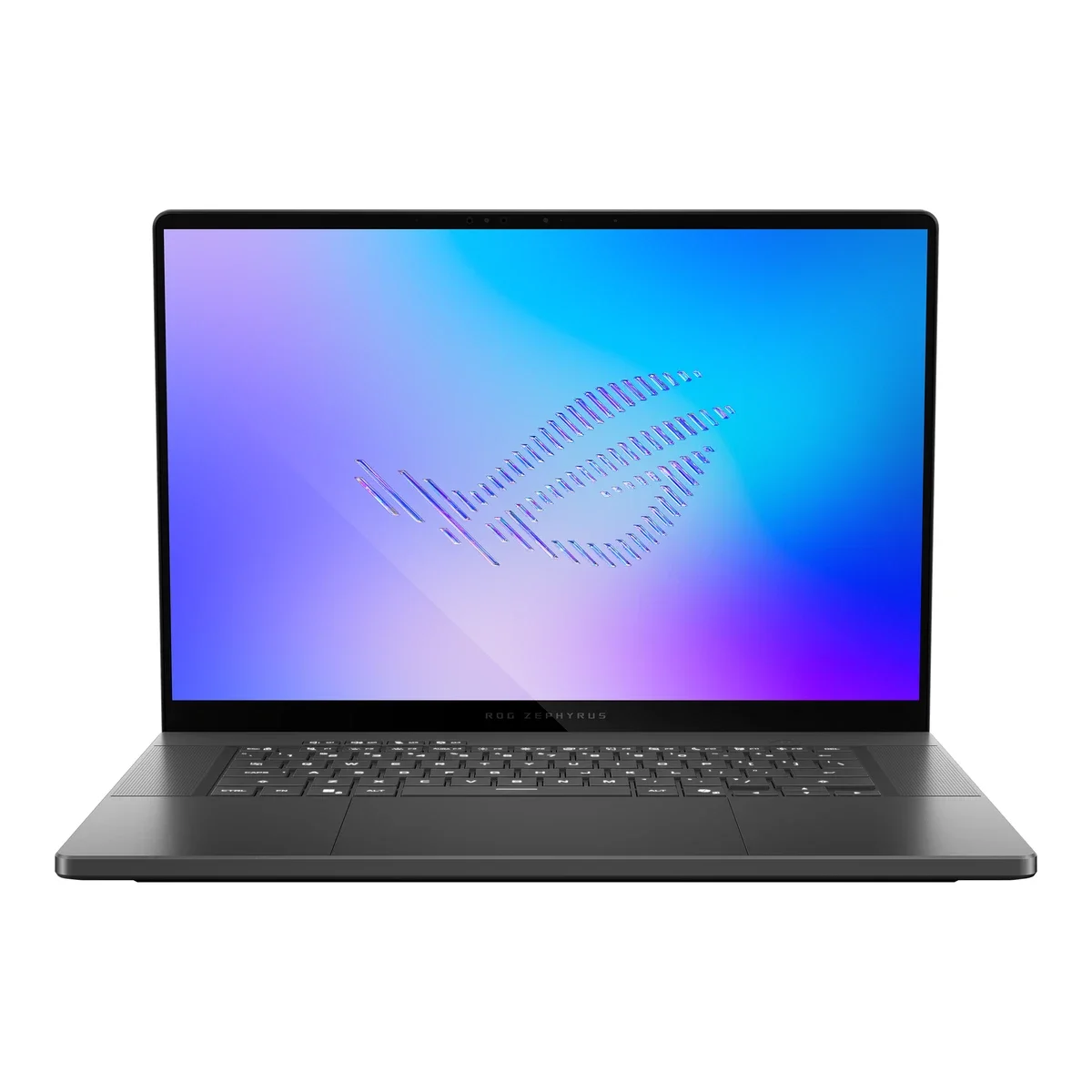
No photos recorded for this color yet
ASUS ROG Zephyrus G16 (2026, GU606)
Product ID: AKS-20261011-25E3
The ASUS ROG Zephyrus G16 (2026, GU606) is ROG's 2026 16-inch gaming laptop. Its CNC-aluminum chassis starts at 1.49cm thin and 1.85kg (1.95kg for higher-end GPUs), and the 16-inch 2.5K 240Hz Nebula HDR OLED is much brighter. It moves to the Intel Core Ultra 9 386H with GPU options from RTX 5060 up to RTX 5090 Laptop, and a reworked intake/exhaust lifts the RTX 5080/5090 power limit to 160W. A 90Wh battery gives a big boost in video playback life thanks to Panther Lake, with a 250W adapter plus USB-C charging; I/O includes Thunderbolt 4, USB-C, dual USB-A, HDMI 2.1 and a full-size SD reader. It has two M.2 slots, but memory is soldered. Taiwan pre-orders opened 2026-04-20 from NT$109,999.
Saved temporarily in this device’s browser only. No long-term storage or syncing.
Official list prices
Pending and starting prices do not confirm the price of a specific variant. Check each market’s currency and tax status.
Taiwan (TW) · 1 TWD 109,999
-
Starting at
TWD 109,999 TW
Product price · Tax included
Official source · Checked
官方定價:NT$109,999 起
Product information
- Brand:
- ASUS
- Category:
- Laptop
- Product line:
- ROG Zephyrus
- Release date:
- 2026-04-17
- Product ID:
- AKS-20261011-25E3
- Official information:
- View manufacturer page
- Last updated:
- Oct 31, 2026
Specifications
Body and display
- Width
- 354 mm
- Depth
- 246 mm
- Minimum height
- 14.9 mm
- Maximum height
- 17.9 mm
- Weight
- 1.85 kg
- Display count
- 1
- Display size
- 16 in
- Display resolution
- 2560 × 1600
- Display technology
- ROG Nebula HDR OLED 16:10 (2.5K, 240Hz, 0.2ms, G-Sync, Pantone Validated, anti-reflection)
- Refresh rate
- 240 Hz
- Touchscreen
- No
Performance and storage
- Operating system
- Windows
- OS version
- 11 Home / 11 Pro (by model)
- Processor
- Intel Core Ultra 9 386H (16 cores, up to 4.9GHz, 18MB cache)
- Graphics
- NVIDIA GeForce RTX 5060 / 5070 Ti / 5080 / 5090 Laptop GPU (by model; RTX 5080/5090 up to 160W in Manual mode; MUX Switch + Advanced Optimus)
- NPU
- Intel NPU, up to 50 TOPS
- Memory type
- LPDDR5X-8533 onboard, 32GB or 64GB (by model, not upgradeable)
- Storage type
- 1TB PCIe 4.0 or 1TB/2TB PCIe 5.0 NVMe M.2 SSD (by model; 2× M.2 slots)
Power and connectivity
- Battery capacity
- 90 Wh
- Power adapter
- 250 W
- Ports
- 1× Thunderbolt 4 (USB4 Type-C, display / charging), 1× USB 3.2 Gen 2 Type-C (DisplayPort / power delivery / G-SYNC), 2× USB 3.2 Gen 2 Type-A, 1× HDMI 2.1 FRL, SD card reader (UHS-II), 1× 3.5mm audio jack
- Wireless
- Wi-Fi 7 (tri-band 2×2); Bluetooth 6.0
- Camera
- 1080p FHD IR camera (Windows Hello)
Product reviews
Based on 4 reviews
Based on a limited sample of reviews.
Dave2D: ROG Zephyrus G16 (2026) — Soldered RAM, Turbo Fan Whistle, OLED Burn-In Worries
Machine translated · Original language: Chinese (Taiwan) · Source language: Chinese (Taiwan)
Source
Dave2D
Key Takeaways
- Fully soldered LPDDR5X memory blocks all DIY RAM upgrades, locking buyers into their initial config forever.
- Triple-fan cooling emits a piercing high-pitched whistle in Turbo mode, mandating noise-canceling headphones.
- While the 2.5K 240Hz OLED looks gorgeous, permanent desktop taskbars bring lingering burn-in anxiety over years.
- Metal underside deck spikes past 49°C during heavy gaming sessions, making lap gaming unfeasible.
✅ Pros
- Exquisite 14.9mm slim CNC aluminum engineering
- Breathtaking 2.5K 240Hz OLED with 0.2ms response
- Punchy six-speaker system punches far above its weight
❌ Cons
- Soldered non-upgradable onboard RAM
- High-pitched whistle fan whine in Turbo mode
- Lingering OLED taskbar burn-in anxiety
- Bottom deck reaches 49°C surface heat
📝 Verdict
"Zephyrus G16 is an engineering triumph let down by soldered RAM, shrill fan noise, and OLED burn-in concerns."
View original
Dave2D:板載記憶體無法自行升級,極限模式風扇尖銳嘯叫與 OLED 烙印焦慮
來源
Dave2D
重點摘要
- 記憶體全部焊死在主機板上,買定離手後完全無法由使用者自行更換或擴充,限制了未來的機器壽命。
- 在 Turbo 狂暴散熱模式下內部三風扇全速運轉,伴隨尖銳刺耳的高頻氣流口哨聲,長時間遊玩需配戴降噪耳機。
- 配備的 2.5K 240Hz OLED 螢幕雖然震撼,但長時間固定桌面工作依然存在靜態工作列烙印的老化焦慮。
- 機身底部全金屬底盤在重載遊戲時表面溫度飆破 49°C,無法放在大腿上進行遊玩。
✅ 優點
- CNC 切削鋁合金機身厚度僅 14.9mm 極致纖薄
- 2.5K 240Hz OLED 螢幕色彩與反應速度無與倫比
- 六揚聲器音效飽滿低音震撼
❌ 缺點
- 板載記憶體焊死完全無法自行擴充
- 極限模式風扇尖銳口哨風噪刺耳
- OLED 長期靜態使用有烙印隱憂
- 機身底部高負載發熱高達 49°C
📝 總結評語
「Zephyrus G16 是工藝極致的輕薄電競筆電,但焊死記憶體與刺耳風扇聲,讓硬核玩家感到遺憾。」
This AI-generated summary is based on the original source and was not written by its creator. It may contain errors or omissions; please consult the original source.
Just Josh: The 2026 G16 is still excellent, but the RTX 5080 / 5090 can't stretch their legs — don't go beyond the 5070 Ti
Machine translated · Original language: Chinese (Taiwan)
Source
- Video: Warning: The 2026 Zephyrus G16 Isn’t What You Think
- Channel: Just Josh | Type: Full review (RTX 5080) | Based on: YouTube transcript
Key points
- The G16 is still one of the best thin-and-light high-end gaming laptops: well built, beautiful, with an excellent OLED.
- ASUS raised the GPU limit for the 5080 / 5090 to 160W, but in testing Cyberpunk ran only slightly better than last year, nearly matching the G14 with a 5070 Ti; GPU scores were about 10–14% lower than the Razer Blade 16 with a 160W 5080.
- In CPU-bound games the Panther Lake processor gives it an edge, but it still loses to the Strix G16 with an HX 3D processor.
- I/O is the same as last year (with the USB-A / C positions swapped between sides); both USB-C ports, left and right, can charge, with the left one using integrated graphics and the right one the discrete GPU for display output.
- The speakers are very good; the 1080p camera is too poor for this price; the battery, Wi-Fi and SSD are replaceable, but the memory is soldered.
- Under Ubuntu 26 only screen brightness can't be adjusted, while Fedora 44 won't boot.
✅ Pros
- Premium build and looks
- Excellent OLED and speakers
- USB-C charging on both sides
- Panther Lake improves CPU-bound games
❌ Cons
- Limited performance gains for the 5080 / 5090
- Poor camera
- Soldered memory
- High price
📝 Verdict
This year's update is a bit disappointing: go no higher than the 5070 Ti version; if you can get last year's model for much less, that's a better choice, and if you really need 5080 / 5090 performance, look at thicker, heavier performance machines instead.
View original
Just Josh:2026 G16 依然優秀,但 RTX 5080/5090 發揮不出來,別買超過 5070 Ti
來源
- 影片:Warning: The 2026 Zephyrus G16 Isn’t What You Think
- 頻道:Just Josh|類型:完整評測(RTX 5080)|摘要依據:YouTube 字幕逐字稿
重點摘要
- G16 仍是最好的輕薄高階電競筆電之一:做工好、外型漂亮、OLED 出色。
- 官方把 5080/5090 的 GPU 上限提高到 160W,但實測 Cyberpunk 只比去年略好,幾乎追平 5070 Ti 的 G14;GPU 分數比同為 160W 5080 的 Razer Blade 16 低約 10–14%。
- CPU 受限的遊戲中,Panther Lake 處理器帶來優勢,但仍輸給搭載 HX 3D 處理器的 Strix G16。
- I/O 與去年相同(左右 USB-A/C 位置對調);左右兩個 USB-C 都能充電,左邊走內顯、右邊走獨顯輸出。
- 喇叭非常好;1080p 鏡頭以這個價位來說太差;電池、Wi-Fi、SSD 可換,記憶體焊死。
- Ubuntu 26 下僅螢幕亮度無法調整,Fedora 44 無法開機。
✅ 優點
- 做工與外型高級
- OLED 與喇叭出色
- 雙側 USB-C 皆可充電
- Panther Lake 改善 CPU 受限遊戲
❌ 缺點
- 5080/5090 效能提升有限
- 鏡頭差
- 記憶體焊死
- 價格高
📝 總結評語
今年的更新有點失望:最多選到 5070 Ti 版;若能用便宜許多的價格買到去年款,那會是更好的選擇;真要 5080/5090 效能請改看厚重的高效能機。
This AI-generated summary is based on the original source and was not written by its creator. It may contain errors or omissions; please consult the original source.
SoulOfTech: The top-spec G16 is the ultimate laptop for portability with uncompromising performance, but its price isn't for most people
Machine translated · Original language: Chinese (Taiwan)
Source
- Video: ROG Zephyrus G16 (2026) Review: Not For The Faint Of Heart!
- Channel: SoulOfTech | Type: Unboxing + full review (top spec RTX 5090 / 64GB / 2TB, Canada) | Based on: YouTube transcript
Key points
- The tested unit is the top spec: Core Ultra 9 386H, 64GB LPDDR5X, RTX 5090 (24GB) and a 2TB SSD, with a barrel-plug DC power adapter.
- The all-metal chassis is minimalist and attractive, at about 4.3 lb (about 1.95kg), much lighter than typical 16-inch gaming laptops; the hinge is smooth and solid with only slight wobble.
- Left side: DC, HDMI 2.1 FRL, USB-A, Thunderbolt 4 and a headphone jack; right side: USB-C (not Thunderbolt), USB-A and a full-size SD card reader.
- Large glass touchpad, but it gets harder to click toward the top; the keyboard has enough travel and clear legends, but the arrow keys are too small and easy to mispress, and there's no number pad.
- 2.5K 240Hz OLED, 100% DCI-P3, with an anti-glare coating that improves every year; he notes some people may prefer a 4K option.
- After 30+ minutes of stress testing, the area above the keyboard reaches about 44°C and fan noise at full load is in the mid-60s dB; the memory is soldered, but there are two M.2 slots (one empty) and the Wi-Fi card is replaceable; battery life is about 7 hours for general work.
✅ Pros
- Thin and light yet available with an RTX 5090
- Solid build and stable hinge
- Great OLED screen and speakers
- An empty second M.2 slot and practical battery life
❌ Cons
- The top spec costs about CA$7,000 in Canada
- Tiny arrow keys; the top of the touchpad won't click
- Soldered memory
📝 Verdict
A laptop for those who want no compromises plus portability: not for budget-minded buyers; to save money, consider cheaper lower-spec configurations or the 2025 model.
View original
SoulOfTech:頂規 G16 是兼顧攜帶性與毫不妥協效能的極致筆電,但價格不是給一般人的
來源
- 影片:ROG Zephyrus G16 (2026) Review: Not For The Faint Of Heart!
- 頻道:SoulOfTech|類型:開箱+完整評測(頂規 RTX 5090/64GB/2TB,加拿大)|摘要依據:YouTube 字幕逐字稿
重點摘要
- 測試的是頂規:Core Ultra 9 386H、64GB LPDDR5X、RTX 5090(24GB)與 2TB SSD,附 DC 圓孔變壓器。
- 全金屬機身極簡好看,約 4.3 磅(約 1.95kg),比一般 16 吋電競筆電輕不少;轉軸順暢扎實、只有輕微晃動。
- 左側 DC、HDMI 2.1 FRL、USB-A、Thunderbolt 4 與耳機孔;右側 USB-C(非 Thunderbolt)、USB-A 與全尺寸 SD 讀卡機。
- 大型玻璃觸控板,但越往上越按不下去;鍵盤鍵程足夠、字體清楚,但方向鍵太小容易誤按,無數字鍵盤。
- 2.5K 240Hz OLED、100% DCI-P3,抗眩光塗層逐年進步;他提到有人可能更想要 4K 選項。
- 30 分鐘以上壓力測試鍵盤上方約 44°C、滿載噪音約 60 分貝中段;記憶體焊死,但有兩個 M.2(一個空槽)且 Wi-Fi 網卡可換;一般工作續航約 7 小時。
✅ 優點
- 輕薄卻能配到 RTX 5090
- 做工扎實、轉軸穩
- OLED 螢幕與喇叭好
- 第二個 M.2 空槽、續航實用
❌ 缺點
- 頂規在加拿大約 7,000 加幣
- 方向鍵太小、觸控板上方按不下
- 記憶體焊死
📝 總結評語
追求不妥協又要攜帶性的人的筆電:不是給精打細算的人,想省錢可以考慮較便宜的低階配置或 2025 年款。
This AI-generated summary is based on the original source and was not written by its creator. It may contain errors or omissions; please consult the original source.
Crimson Tech: The G16 2026 is the most balanced 16-inch laptop, but after the price increase it isn't worth buying at full price
Machine translated · Original language: Chinese (Taiwan)
Source
- Video: Asus ROG Zephyrus G16 (2026) REVIEW - The BEST 16" Gaming / Creator Laptop (For a price...)
- Channel: Crimson Tech | Type: Full review (RTX 5080) | Based on: YouTube transcript
Key points
- The all-aluminum chassis barely flexes; the new bottom intake design feels more solid, and he didn't hear the previous generation's odd noises even after long gaming sessions; the Slash lighting bar gains a glass layer.
- At about 1.9kg, it's one of the most portable gaming laptops of its size; the GPU limit on the 5080 / 5090 versions is raised to 160W.
- The keyboard is still in his top five, but only has single-zone RGB; the glass touchpad is large, but the top ~30% won't click, and he wishes ASUS would switch to a haptic touchpad.
- The 2.5K 240Hz OLED's brightness rises from 500 to 1,100 nits, and he thinks it's currently the best laptop screen; the speakers are the best on any Windows laptop.
- YouTube playback lasts over 17 hours, about double the previous generation; even Minecraft gaming lasts nearly 4 hours; 100W USB-C charging is supported.
- Dual M.2 slots, but soldered memory; the 5070 Ti version costs about US$3,600 and the 5080 version about US$4,800, which he doesn't think is worth full price.
✅ Pros
- One of the best laptop screens, now brighter
- Thin and light with strong performance
- Double the battery life
- Excellent speakers
❌ Cons
- Single-zone RGB; the top of the touchpad won't click
- Soldered memory
- Too expensive after the price increase
📝 Verdict
The most complete, balanced 16-inch laptop: the top pick if budget allows, but last year's model is still on sale for much less, so buying at full price doesn't make sense.
View original
Crimson Tech:G16 2026 是最均衡的 16 吋筆電,但在漲價後不值得原價購入
來源
- 影片:Asus ROG Zephyrus G16 (2026) REVIEW - The BEST 16" Gaming / Creator Laptop (For a price...)
- 頻道:Crimson Tech|類型:完整評測(RTX 5080)|摘要依據:YouTube 字幕逐字稿
重點摘要
- 全鋁機身幾乎無彎曲;新底部進風設計更扎實,長時間遊戲後也沒聽到前代的異音;Slash 燈條加上玻璃層。
- 約 1.9kg,是同尺寸最好攜帶的電競筆電之一;5080/5090 版 GPU 上限提高到 160W。
- 鍵盤仍是他心目中前五名,但只有單區 RGB;玻璃觸控板很大,但上方約 30% 按不下去,他希望改用觸覺式觸控板。
- 2.5K 240Hz OLED 亮度從 500 提高到 1,100 尼特,他認為是目前最好的筆電螢幕;喇叭是 Windows 筆電最好。
- YouTube 播放續航超過 17 小時,約為前代的兩倍;Minecraft 遊戲也接近 4 小時;支援 100W USB-C 充電。
- 雙 M.2 插槽,但記憶體焊死;5070 Ti 版約 US$3,600、5080 版約 US$4,800,他認為原價不值得。
✅ 優點
- 最好的筆電螢幕之一、更亮
- 輕薄但效能強
- 續航翻倍
- 喇叭極佳
❌ 缺點
- 單區 RGB、觸控板上方按不下
- 記憶體焊死
- 漲價後售價過高
📝 總結評語
最完整均衡的 16 吋筆電:預算充足就是首選;但去年款仍在賣而且便宜很多,原價購入不划算。
This AI-generated summary is based on the original source and was not written by its creator. It may contain errors or omissions; please consult the original source.