
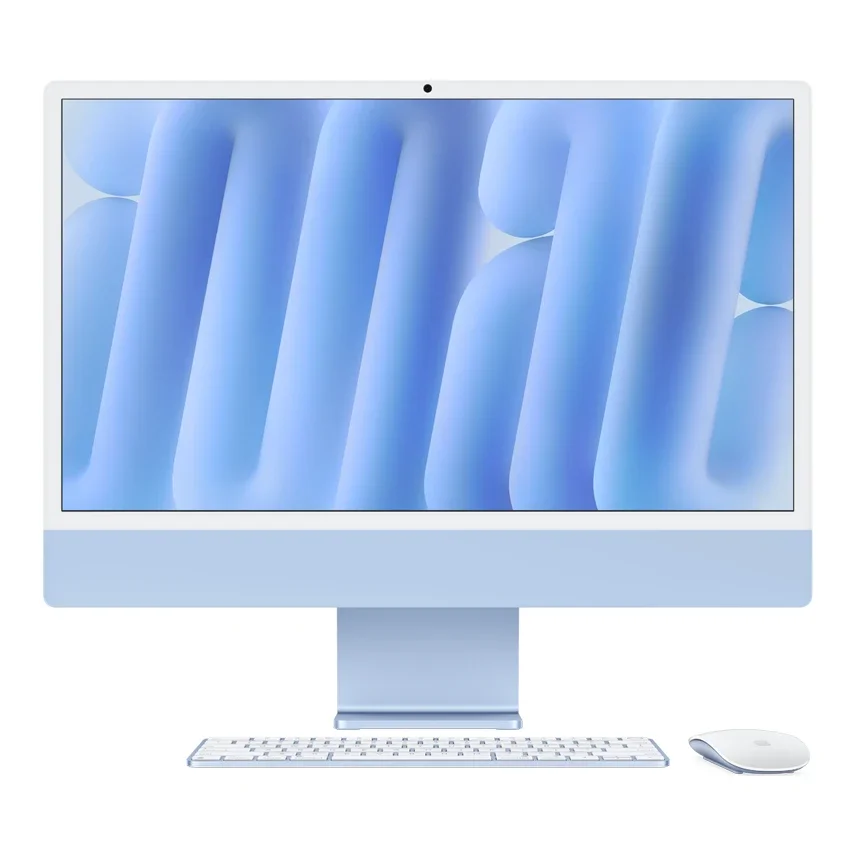
No photos recorded for this color yet
Apple iMac 24-inch (M4)
Product ID: AKS-20261009-ECWX
The Apple iMac 24-inch (M4) is Apple's 24-inch all-in-one desktop (23.5-inch actual diagonal), with a color-matched Magic Keyboard and Magic Mouse in seven colors: Blue, Purple, Pink, Orange, Yellow, Green and Silver. It has a 4.5K Retina display (500 nits, P3 wide color) and Apple M4 with Apple Intelligence support, plus a 12MP Center Stage camera, six-speaker sound system, studio-quality three-mic array, Wi-Fi 6E and Bluetooth 5.3. The two-port model has an 8-core CPU/8-core GPU; four-port models have a 10-core CPU/10-core GPU, Gigabit Ethernet and a Touch ID keyboard as standard (optional on the two-port model), plus optional nano-texture glass. Memory is 16GB to 32GB and SSD 256GB to 2TB. Released 2024-11-08; from NT$49,900 on Apple Taiwan as of October 2026.
Saved temporarily in this device’s browser only. No long-term storage or syncing.
Official list prices
Pending and starting prices do not confirm the price of a specific variant. Check each market’s currency and tax status.
Taiwan (TW) · 1 TWD 49,900
-
Starting at
TWD 49,900 TW
Product price · Tax included
Official source · Checked
官方定價:NT$49,900 起
Product information
- Brand:
- Apple
- Category:
- Desktop computer
- Product line:
- iMac
- Release date:
- 2024-11-08
- Product ID:
- AKS-20261009-ECWX
- Official information:
- View manufacturer page
- Last updated:
- Oct 31, 2026
Specifications
Performance & system
- Processor
- Apple M4, 8-core CPU (two-port) or 10-core CPU (four-port)
- Graphics processor
- Apple M4 8-core or 10-core GPU
- Memory type
- Unified memory, 16GB–32GB
- Storage type
- SSD, 256GB–2TB
- Operating system
- macOS
- Form factor
- All-in-one
Display
- Display size
- 23.5 in
- Display resolution
- 4480 × 2520 (218 ppi)
- Display technology
- 4.5K Retina, P3 wide color; nano-texture optional on four-port models
- Peak brightness
- 500 nits
Connectivity & compatibility
- Ports
- 2 or 4× Thunderbolt 4 (USB-C), 3.5mm jack; Gigabit Ethernet (standard on four-port models)
- Wireless connectivity
- Wi-Fi 6E
- Bluetooth version
- 5.3
Product reviews
Based on 4 reviews
Based on a limited sample of reviews.
Snazzy Labs: 24-inch iMac (M4) Review — Crippled 2-Port Base Model & Target Display Mode Death
Machine translated · Original language: Chinese (Taiwan) · Source language: Chinese (Taiwan)
Source
Snazzy Labs
Key Takeaways
- Base configuration is aggressively crippled: only two Type-C ports, no Touch ID keyboard, and no Ethernet on the power brick.
- Complete lack of Target Display Mode means this magnificent 4.5K panel becomes instant e-waste once the logic board ages.
- Locked down to a mundane 60Hz refresh rate while the rest of the industry has moved to silky 120Hz/144Hz standards.
- Zero front or side I/O ports; plugging in flash drives or headphones forces clumsy blind groping behind the screen.
✅ Pros
- M4 silicon brings class-leading single-core efficiency
- Sublime 4.5K color rendering and crispness
- Beautiful color-matched braided cabling
❌ Cons
- Brutally crippled 2-port base model
- No Target Display Mode turns panel into future e-waste
- Stuck on dated 60Hz refresh rate
- Awkward rear-only port ergonomics
📝 Verdict
"M4 iMac has great silicon marred by a crippled base tier and the refusal to let the 4.5K screen function as an external monitor."
View original
Snazzy Labs:雙孔閹割版無網路接口,萬年不變的 24 吋與不能外接作顯示器
來源
Snazzy Labs
重點摘要
- 起價入門款無情閹割成僅有兩個 Type-C 接口,缺少鍵盤 Touch ID 指紋鍵,電源變壓器上更拔除乙太網路接口。
- 不支援 Target Display 目標顯示模式,這塊頂級的 4.5K 視網膜面板在電腦主機板淘汰後無法作為外接螢幕使用,淪為電子垃圾。
- 螢幕更新率依然鎖死在 60Hz,在同價位所有外接螢幕皆邁入 120Hz/144Hz 的年代顯得拖泥帶水。
- 缺少正面或側面快捷接口,每次插拔隨身碟或耳機都必須盲摸伸到螢幕背面摸索,極度反人體工學。
✅ 優點
- M4 晶片在單核心運算表現極佳
- 4.5K 螢幕細節細膩色彩飽滿
- 彩色編織線材做工賞心悅目
❌ 缺點
- 入門版閹割雙接口且無網路孔
- 無法單純外接作為顯示器使用
- 依然維持 60Hz 慢速螢幕
- 背面接口盲插極其不便
📝 總結評語
「iMac 24 吋 M4 效能雖強,但入門款惡意閹割與無法當外接螢幕的限制,讓它過期後淪為昂貴垃圾。」
This AI-generated summary is based on the original source and was not written by its creator. It may contain errors or omissions; please consult the original source.
MacRumors: The M4 iMac is a great desktop for most people — go straight for the model with 4 Thunderbolt ports
Machine translated · Original language: Chinese (Taiwan)
Source
- Video: Apple M4 iMac Review: Best M4 Mac for EVERYONE?
- Channel: MacRumors | Type: Review after several weeks of use (2024) | Based on: YouTube transcript (fetched with youtube-transcript-api)
Key points
- It looks much the same as the M3 and M1 versions; for anyone still on an Intel iMac or finding the M1 insufficient, he thinks now is a good time to upgrade.
- The M4 chip handles browsing, office work and video calls with ease; at the event he saw games such as Cyberpunk 2077 running smoothly on M4 Macs.
- What he considers the most underrated change: all 4 ports on the 10-core model are Thunderbolt 4 (only 2 were Thunderbolt on the previous generation); the 8-core base model still has only 2 Thunderbolt ports.
- The new 12MP Center Stage camera supports Desk View; he uses the yellow model, whose back leans toward a mustard gold; the iMac is a machine where looks matter, and if you don't care, silver is a classic that never gets old.
- Starts at $1,299 in the US; he recommends upgrading to the 10-core model for more performance and 4 ports, adding storage, and going with 24GB of memory to be safe for long-term use. Apple Intelligence Writing Tools and notification summaries are the features he uses most.
✅ Pros
- M4 performance is enough for daily use and light gaming
- All 4 ports on the 10-core model are Thunderbolt 4
- Center Stage camera
- Colors with personality
❌ Cons
- The 8-core base model has only 2 ports
- Same design as the previous generation
- Small base storage
📝 Verdict
An all-round desktop for most people: unless you need M4 Pro / Max–level performance, the M4 iMac is more than enough for daily use and creative work; the 10-core, 4-port model is recommended.
View original
MacRumors:M4 iMac 是給大多數人的好桌機,建議直接選 4 個 Thunderbolt 埠的機型
來源
- 影片:Apple M4 iMac Review: Best M4 Mac for EVERYONE?
- 頻道:MacRumors|類型:使用數週評測(2024 年)|摘要依據:YouTube 字幕逐字稿(youtube-transcript-api 擷取)
重點摘要
- 外觀與 M3、M1 版差異不大;對仍在用 Intel iMac 或覺得 M1 不夠用的人,他認為現在是升級的好時機。
- M4 晶片處理瀏覽、文書、視訊通話都很輕鬆;他在活動中看到《電馭叛客 2077》等遊戲在 M4 Mac 上執行流暢。
- 他認為最被低估的改變:10 核心機型的 4 個連接埠全是 Thunderbolt 4(前代只有 2 個是 Thunderbolt);8 核心基本款仍只有 2 個 Thunderbolt 埠。
- 新的 12MP Center Stage 相機支援桌上視角;他用的是黃色款,背面偏芥末金色,iMac 是重視外觀的機器,不在乎的話銀色經典耐看。
- 美國售價 1,299 美元起;他建議升級到 10 核心機型取得更多效能與 4 個連接埠,加大儲存,記憶體 24GB 對長期使用較保險。Apple Intelligence 寫作工具與通知摘要是他最常用的功能。
✅ 優點
- M4 效能日常與輕度遊戲都足夠
- 10 核心機型 4 個連接埠皆為 Thunderbolt 4
- Center Stage 相機
- 色彩選擇有個性
❌ 缺點
- 8 核心基本款只有 2 個連接埠
- 外觀設計與前代相同
- 基本儲存空間偏小
📝 總結評語
大多數人的全能桌機:除非需要 M4 Pro/Max 等級效能,M4 iMac 對日常與創作都綽綽有餘,建議選 10 核心、4 埠機型。
This AI-generated summary is based on the original source and was not written by its creator. It may contain errors or omissions; please consult the original source.
Kyle Erickson: The M4 iMac may be Apple's best-value desktop, with the display, keyboard and mouse all in one purchase
Machine translated · Original language: Chinese (Taiwan)
Source
- Video: iMac M4 After 1 Week: Apple's BEST Value Desktop Yet!
- Channel: Kyle Erickson | Type: One-week review (2024) | Based on: YouTube transcript (fetched with youtube-transcript-api)
Key points
- He thinks the M4 iMac is the most underrated product of the year: although it lacks Pro / Max chips, most people don't need them.
- The value math: for a 10-core M4, 16GB, 256GB configuration, buying a Mac mini, a Magic Keyboard with Touch ID ($149), a Magic Mouse ($79) and a Studio Display–class monitor separately would still cost more than the iMac, even with the Studio Display's price cut in half.
- With 16GB of memory, photo editing, graphic design and Final Cut Pro editing are all smooth, though some heavy plugins are slower than on the M4 Pro; the Xcode benchmark is about 27% faster than the M3 and about 25% slower than the M4 Pro.
- The six speakers have excellent detail and clarity, with Dolby Atmos and Spatial Audio support; the three microphones pick up sound well; the new camera's image quality beats the M3 iMac, Center Stage is very practical, while Desk View is more of a gimmick.
- He thinks the most important upgrades are the M4 chip and the base memory going from 8GB to 16GB at no extra cost; apart from more storage, most people don't need higher specs.
✅ Pros
- Buying the whole package is better value than assembling it separately
- 16GB base, enough for daily use and creative work
- Excellent speakers and microphones
- Practical Center Stage camera
❌ Cons
- Noticeably slower than the M4 Pro with heavy plugins and large projects
- Base storage needs upgrading
- Desk View is more of a gimmick
📝 Verdict
The best-value complete Mac desktop setup: if you need to buy a whole new system, the M4 iMac's overall value is hard to beat.
View original
Kyle Erickson:M4 iMac 可能是 Apple 最超值的桌機,一次買齊螢幕、鍵盤與滑鼠
來源
- 影片:iMac M4 After 1 Week: Apple's BEST Value Desktop Yet!
- 頻道:Kyle Erickson|類型:使用一週評測(2024 年)|摘要依據:YouTube 字幕逐字稿(youtube-transcript-api 擷取)
重點摘要
- 他認為 M4 iMac 是今年最被低估的產品:雖然沒有 Pro/Max 晶片,但多數人不需要。
- 價值計算:以 10 核心 M4、16GB、256GB 的配置來說,若拆開買 Mac mini、含 Touch ID 的巧控鍵盤(149 美元)、巧控滑鼠(79 美元)與 Studio Display 等級的螢幕,即使把 Studio Display 價格砍半仍比 iMac 貴。
- 16GB 記憶體下修圖、平面設計與 Final Cut Pro 剪片都順暢,部分重度外掛比 M4 Pro 慢;Xcode 跑分比 M3 快約 27%、比 M4 Pro 慢約 25%。
- 六揚聲器細節與清晰度出色、支援杜比全景聲與空間音訊;三麥克風收音好;新相機畫質比 M3 iMac 好、Center Stage 很實用,桌上視角則偏噱頭。
- 他認為最重要的升級是 M4 晶片與基本款記憶體從 8GB 提升到 16GB 且不加價;除了加大儲存,大部分人不需要更高規格。
✅ 優點
- 整套購買比拆開組合更划算
- 16GB 起跳,日常與創作都足夠
- 喇叭與麥克風出色
- Center Stage 相機實用
❌ 缺點
- 重度外掛與大型專案明顯慢於 M4 Pro
- 基本儲存空間需加購
- 桌上視角功能偏噱頭
📝 總結評語
最超值的完整 Mac 桌面方案:如果需要買一整套新系統,M4 iMac 的整體價值很難被打敗。
This AI-generated summary is based on the original source and was not written by its creator. It may contain errors or omissions; please consult the original source.
Max Tech: The M4 iMac has more upgrades than expected — 16GB base at no extra cost, well worth it for M1 owners
Machine translated · Original language: Chinese (Taiwan)
Source
- Video: M4 iMac 2024 - 10 MAJOR Reasons to Upgrade!
- Channel: Max Tech | Type: Breakdown of reasons to upgrade (2024) | Based on: YouTube transcript (fetched with youtube-transcript-api)
Key points
- The biggest upgrade: base memory goes from 8GB to 16GB while the price stays at $1,299; he thinks this was long overdue and matters most for consumers who buy the base model in stores.
- All 4 ports on the 10-core model support Thunderbolt 4 (the M4 has four Thunderbolt controllers); but the $1,299 base model still has only 2 ports.
- The included Magic Keyboard, Magic Mouse and Magic Trackpad all switch to USB-C; multi-core performance is about 27% faster than the previous generation, on par with the pricier M3 Pro, and graphics performance improves too.
- The 12MP Center Stage camera automatically follows to keep you framed; the memory ceiling rises to 32GB for the first time; the new colors are more vivid.
- Downsides: the 8-core base model's GPU is cut to 8 cores (the previous base model had the full 10 cores); Wi-Fi 6E and Bluetooth 5.3 weren't upgraded. M3 owners won't see much difference, but M1 owners have good reason to upgrade; he recommends the $1,499 10-core model.
✅ Pros
- 16GB base at no extra cost
- 4 Thunderbolt 4 ports on the 10-core model
- Accessories switch to USB-C
- Memory ceiling raised to 32GB
❌ Cons
- The base model has only an 8-core GPU and just 2 ports
- No wireless upgrade
- Small upgrade for M3 owners
📝 Verdict
A good upgrade for M1 owners: the M4 iMac improves more than its looks suggest, and the 10-core model is the most balanced choice.
View original
Max Tech:M4 iMac 升級比預期多,16GB 起跳且不加價,M1 用戶很值得換
來源
- 影片:M4 iMac 2024 - 10 MAJOR Reasons to Upgrade!
- 頻道:Max Tech|類型:升級理由解析(2024 年)|摘要依據:YouTube 字幕逐字稿(youtube-transcript-api 擷取)
重點摘要
- 第一大升級:基本款記憶體從 8GB 提升到 16GB,售價維持 1,299 美元,他認為早該如此,對買門市基本款的消費者影響最大。
- 10 核心機型的 4 個連接埠都支援 Thunderbolt 4(M4 有四個 Thunderbolt 控制器);但 1,299 美元基本款仍只有 2 個連接埠。
- 隨附巧控鍵盤、滑鼠、觸控板全面改為 USB-C;多核效能約比前代快 27%,與更貴的 M3 Pro 相當,圖形效能也有提升。
- 12MP Center Stage 相機會自動追蹤構圖;記憶體上限首次提高到 32GB;新配色更鮮明。
- 缺點:8 核心基本款 GPU 被砍到 8 核心(前代基本款為完整 10 核心);Wi-Fi 6E 與藍牙 5.3 沒有升級。M3 用戶差異不大,M1 用戶則很值得升級,他推薦 1,499 美元的 10 核心機型。
✅ 優點
- 16GB 起跳且不加價
- 10 核心機型 4 個 Thunderbolt 4 埠
- 配件改為 USB-C
- 記憶體上限提高到 32GB
❌ 缺點
- 基本款 GPU 只有 8 核心、僅 2 個連接埠
- 無線規格沒有升級
- M3 用戶升級幅度小
📝 總結評語
給 M1 用戶的好升級:M4 iMac 的改進比外觀看起來多,選 10 核心機型最均衡。
This AI-generated summary is based on the original source and was not written by its creator. It may contain errors or omissions; please consult the original source.