
No photos recorded for this color yet
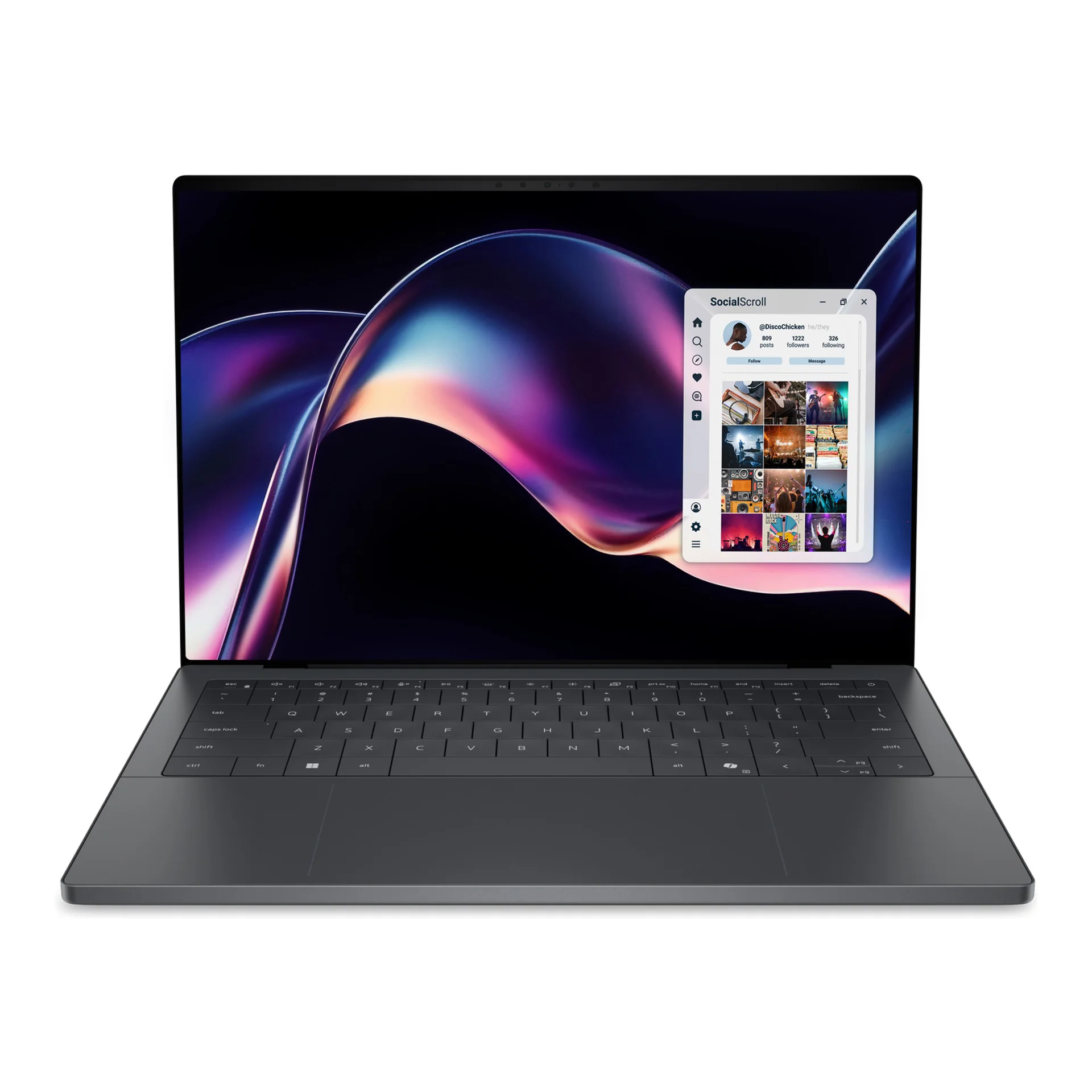
Dell XPS 14 (2026)
Product ID: AKS-20261006-ZTCD
The Dell XPS 14 (2026) is a premium thin Windows laptop (model DA14260), about 14.6–15.2mm thick and from 1.36kg. It runs Intel Core Ultra Series 3 (up to Core Ultra X9), with Intel Arc graphics on higher SKUs and a 14-inch 2K 1–120Hz LCD or 2.8K OLED touch display. It also has three Thunderbolt 4 ports, Wi-Fi 7 / Bluetooth 6.0, a 70Wh battery and a 100W USB-C adapter. Configurations span 16–64GB LPDDR5x and 512GB–4TB SSD. Graphite; listed on Dell Taiwan.
Saved temporarily in this device’s browser only. No long-term storage or syncing.
Official list prices
Pending and starting prices do not confirm the price of a specific variant. Check each market’s currency and tax status.
No verified official price available
Product information
- Brand:
- Dell
- Category:
- Laptop
- Product line:
- XPS
- Release date:
- 2026-01-06
- Product ID:
- AKS-20261006-ZTCD
- Official information:
- View manufacturer page
- Last updated:
- Oct 29, 2026
Specifications
Body and display
- Width
- 309.52 mm
- Depth
- 209.71 mm
- Minimum height
- 14.62 mm
- Maximum height
- 15.2 mm
- Weight
- 1.36 kg
- Display count
- 1
- Display size
- 14 in
- Display resolution
- 1920 × 1200 or 2880 × 1800 (depending on configuration)
- Display technology
- 2K InfinityEdge LCD (500 nits, 1–120Hz, non-touch) or 2.8K OLED InfinityEdge (400 nits typical / 500 nits peak, 20–120Hz, touchscreen)
- Refresh rate
- 120 Hz
Performance and storage
- Operating system
- Windows
- OS version
- 11 Home
- Processor
- Intel Core Ultra Series 3 (official options include Ultra 5 325, Ultra 7 355, Ultra X7 358H and Ultra X9 388H)
- Graphics
- Intel graphics; higher-end processor configurations may include Intel Arc graphics
- NPU
- Intel AI Boost NPU (approximately 47–50 TOPS as specified by the manufacturer, depending on processor)
- Memory type
- LPDDR5x (official options: 16 / 32 / 64GB)
- Storage type
- M.2 NVMe PCIe 4.0 SSD (official options start at 512GB)
Power and connectivity
- Battery capacity
- 70 Wh
- Power adapter
- 100 W
- Ports
- 3× Thunderbolt 4 (USB-C, DisplayPort 2.1 / Power Delivery; Kensington lock support); universal audio jack
- Wireless
- Intel Wi-Fi 7 BE211 2×2; Bluetooth 6.0
- Color
- Graphite
Product reviews
Based on 4 reviews
Based on a limited sample of reviews.
Dave2D: Dell XPS 14 (2026) Review — Invisible Trackpad Rage, Severe Throttling, High Price
Machine translated · Original language: Chinese (Taiwan) · Source language: Chinese (Taiwan)
Source
Dave2D
Key Takeaways
- Completely smooth seamless glass trackpad lacks tactile borders, causing constant accidental cursor slips.
- Capacitive touch bar has zero physical feedback, leading to infuriating missed Esc taps during coding and editing.
- Thermal limitations severely choke the discrete RTX GPU, holding it back to disappointing low wattage curves.
- Only three Type-C ports with an inflated $2,000+ price tag, offering terrible value against competing business flagships.
✅ Pros
- Exemplary CNC aluminum build quality
- Gorgeous 3.2K 120Hz OLED with deep blacks
- Crisp, immersive speaker sound profile
❌ Cons
- Imprecise boundary-less trackpad usability
- Miserable capacitive touch function row
- Aggressive GPU power throttling under heat
- Extremely overpriced starting configuration
📝 Verdict
"XPS 14 is a stunning fashion piece crippled by an invisible trackpad, capacitive keys, and harsh thermal limits."
View original
Dave2D:無法盲操的隱形觸控板,嚴重高溫降頻與高昂定價
來源
Dave2D
重點摘要
- 完全平滑的無邊界玻璃觸控板毫無邊界觸覺提示,盲打中游標頻繁跑偏丟失,嚴重打亂打字節奏。
- 頂部電容觸控條無按壓回饋,寫程式或影音剪輯時頻繁誤觸或按空 Esc,令人無比惱火。
- 機身內部散熱規格縮水,在連續負載下 RTX 顯卡功率被鎖定在低功耗區間,無法發揮應有效能。
- 全機身僅配置 3 個 Type-C 接口,售價卻大幅飆漲超過兩千美元,在同級商務筆電中毫無性價比。
✅ 優點
- 外觀做工細膩如一件精緻的現代工藝品
- 3.2K 120Hz OLED 螢幕色彩精準對比極致
- 揚聲器中高頻通透音質出色
❌ 缺點
- 盲操體驗極差的無邊界觸控板
- 電容觸控功能鍵反人類
- 散熱壓制不住性能遭閹割
- 超過兩千美元極端昂貴
📝 總結評語
「XPS 14 外觀前衛奪目,但盲打災難的觸控板與嚴重的降頻發熱,讓它淪為昂貴的花瓶。」
This AI-generated summary is based on the original source and was not written by its creator. It may contain errors or omissions; please consult the original source.
Notebookcheck: The XPS 14 reborn — refined and long-lasting, but you pay for the logo
Machine translated · Original language: Chinese (Taiwan)
Source
- Video: Dell XPS 14 2026 review - (A LOT) better?!
- Channel: NotebookcheckReviews | Type: Lab-data-focused full review | Based on: YouTube transcript
Key points
- Who it's for: people who want a thin, light, premium Windows laptop for everyday + moderate creative work; think twice if you want maximum value / full creator color presets.
- The chassis is smaller and lighter yet still extremely sturdy; he personally likes the keyboard (unlike Just Josh — a difference in feel); the etched trackpad borders help.
- OLED: great contrast / gamut / calibration, but brightness is lower than its class and the PWM frequency is low, so sensitive users should try it in person; the IPS has surprising contrast but roughly sRGB gamut and slower response.
- The X7 + Arc B390 system performs well and can beat older thin laptops with discrete GPUs; the non-X four-core GPU is much weaker for gaming / graphics.
- Battery life: in their Wi-Fi test, the OLED config lasts about 16h45m and the IPS about 14.5h (120Hz, VRR off); overall excellent, but price is the 2026 pain point.
✅ Pros
- Mature build quality, thinness, battery life and thermals
- The X7 config handles a lot of creative work and light gaming
- Both screen options have their strengths (OLED image quality vs IPS power-saving potential)
❌ Cons
- OLED brightness and PWM; IPS compromises on gamut and response time
- Dropping the Premier Color presets is unfriendly to some creators
- The premium experience comes with a brand premium; low-end CPU / GPU configs don't match the chassis price
📝 Verdict
"Dell has stitched together the old XPS's substance with recent years' lifestyle experiments — excellent, but you'll pay for that logo." — Lab results lean positive.
View original
Notebookcheck:XPS 14 重生——精緻、長續航,但要為標誌付費
來源
- 影片:Dell XPS 14 2026 review - (A LOT) better?!
- 頻道:NotebookcheckReviews|類型:實驗室數據向完整評測|摘要依據:YouTube 字幕逐字稿
重點摘要
- 適合誰:要輕薄高質感 Windows、日常+中度創作;要極致性價比/完整創作者色彩預設需三思。
- 機身更小更輕仍極堅固;鍵盤他個人喜歡(與 Just Josh 評價不同,屬體感分歧);觸控板蝕刻邊界有幫助。
- OLED:對比/色域/校準佳,但亮度相對同級偏低、PWM 頻率低需敏感者實機試;IPS 對比驚人但色域約 sRGB、響應偏慢。
- X7+Arc B390 系統性能佳、可勝舊款獨顯薄機;非 X 的四核 GPU 遊戲/圖形弱很多。
- 續航:其 Wi-Fi 測試 OLED 配置約 16h45m、IPS 約 14.5h(120Hz、未開 VRR 條件);總評優秀但價格是 2026 痛點。
✅ 優點
- 做工、輕薄與續航/溫控表現成熟
- X7 配置勝任許多創作與輕度遊戲
- 雙螢幕選項各有擅場(OLED 畫質 vs IPS 省電潛力)
❌ 缺點
- OLED 亮度與 PWM;IPS 色域與回應速度妥協
- 去掉 Premier Color 預設對部分創作者不友善
- 高階體驗要付品牌溢價;低階 CPU/GPU 配不上機身價
📝 總結評語
「Dell 把舊 XPS 的實力派與近年的生活風格實驗縫在一起——優秀,但你會為那塊標誌付錢。」 — 實驗室向偏正面。
This AI-generated summary is based on the original source and was not written by its creator. It may contain errors or omissions; please consult the original source.
Just Josh: The new XPS has highs and lows — the base 14-inch is the sweet spot, but too expensive
Machine translated · Original language: Chinese (Taiwan)
Source
- Video: The Truth About the New XPS (Unpaid Review)
- Channel: Just Josh | Type: Full review with no manufacturer sponsorship (multiple 14 / 16 configs) | Based on: YouTube transcript
Key points
- Who it's for: people who want a thin-and-light Windows laptop with top-tier build and very long battery life, and who can wait for discounts; not for those who care a lot about keyboard feel, need many ports, or want to fully unleash the X-series power.
- Highs: build quality, trackpad, speakers, Panther Lake, outstanding battery life on the base XPS 14, and a good-enough OLED.
- Lows: lots of keyboard typos (short travel + keys too close together), essentially only three Thunderbolt 4 ports, and the 14-inch X-series being capped at about 25W, which hurts performance.
- In the end, he most recommends the base 14-inch (not even necessarily upgrading to the Ultra 7); for the X / B390, he suggests the 16-inch instead. The current price is high relative to the MacBook Air / rivals, so wait for a sale.
✅ Pros
- Chassis quality and trackpad come close to Mac level
- Outstanding battery life on the base 14-inch
- Excellent speakers, face login and a compact 100W charger
❌ Cons
- The keyboard is the Achilles' heel; many people only notice how bad it is after real use
- Too few ports; a clear power limit on the high-end chips
- Not competitive at the current price; needs a discount
📝 Verdict
"Better than the old XPS, but at the flagship price they're asking, with highs paired with lows, it's hard to feel good about the current price." — The machine has substance; the pricing and keyboard hold it back.
View original
Just Josh:新 XPS 有高峰也有低谷——基礎 14 吋最香,但太貴
來源
- 影片:The Truth About the New XPS (Unpaid Review)
- 頻道:Just Josh|類型:無廠商置入完整評測(14/16 多配置)|摘要依據:YouTube 字幕逐字稿
重點摘要
- 適合誰:想要頂級做工+超長續航的 Windows 輕薄机、能等折扣者;不適合重鍵盤手感、要多接口、要吃滿 X 系列功耗的人。
- 高峰:做工、觸控板、喇叭、Panther Lake、基礎 XPS 14 續航極強、OLED 夠用。
- 低谷:鍵盤失誤多(短行程+按鍵過近)、幾乎只有三個 Thunderbolt 4、14 吋 X 系列被鎖在約 25W 導致效能吃虧。
- 他最終最推的是基礎 14 吋(甚至不一定要升 Ultra 7);要 X/B390 較建議 16 吋。現價相對 MacBook Air/競品偏高,等打折。
✅ 優點
- 機身質感與觸控板接近 Mac 級
- 基礎 14 吋續航表現突出
- 喇叭、人臉登入、小型 100W 充電器優秀
❌ 缺點
- 鍵盤是阿基里斯腱,多人實用後才感覺差
- 端口過少;高階晶片功耗牆明顯
- 現價竞争力不足,需要折扣
📝 總結評語
「比舊 XPS 好,但以他們開的旗艦價,高峰配上低谷,現價很難心安理得。」 — 機器有料,定價與鍵盤拖後腿。
This AI-generated summary is based on the original source and was not written by its creator. It may contain errors or omissions; please consult the original source.
Dave2D: CES first look — the XPS is back (partnership video, not a full formal review)
Machine translated · Original language: Chinese (Taiwan)
Source
- Video: The New Dell XPS - It's Back and SO MUCH Better!
- Channel: Dave2D | Type: CES first look in partnership with Dell (14 / 16) | Based on: YouTube transcript
Key points
- Who it's for: people who want an early look at the design direction of the 2026 XPS; pair it with other unsponsored full reviews before deciding to buy.
- The partnership with Dell is disclosed at the start of the video; benchmark numbers couldn't be published.
- Key impressions: a stiffer CNC aluminum chassis, the return of a physical function row, trackpad edges you can feel, an optional tandem OLED, integrated graphics only (no NVIDIA option), a 70Wh high-energy-density battery, three Thunderbolt 4 ports, no SD.
- He gives positive first impressions of the thin-and-light chassis's rigidity and the keyboard's return to physical keys.
✅ Pros
- Strong first impressions of design and build
- The return of physical Esc / function keys fixes an old pain point
- Promising battery tech and thin-and-light construction
❌ Cons
- A partnership first look, with no full independent benchmark / battery conclusions
- Still no SD; he finds it a shame the 16-inch also has 70Wh
- Not enough to base a final buying decision on this video alone
📝 Verdict
"The XPS brand is back and first impressions are great — but this is a partnership first look, not the final report card." — The score reflects "positive impressions but insufficient evidence"; please see other full reviews.
View original
Dave2D:CES 搶先看——XPS 回來了(合作影片,非正式完整評測)
來源
- 影片:The New Dell XPS - It's Back and SO MUCH Better!
- 頻道:Dave2D|類型:CES 與 Dell 合作的搶先體驗(14/16)|摘要依據:YouTube 字幕逐字稿
重點摘要
- 適合誰:想先了解 2026 XPS 設計方向的人;購買決策請搭配其他無置入完整評測。
- 影片開頭即標示與 Dell 合作;無法公布跑分數字。
- 重點印象:CNC 鋁機更硬、實體功能列回歸、觸控板邊界可觸感辨識、可選 tandem OLED、僅內顯(無 NVIDIA 選項)、70Wh+高能量密度電池、三個 Thunderbolt 4、無 SD。
- 他對輕薄機身的剛性與鍵盤回歸實體鍵給予正面第一印象。
✅ 優點
- 設計與做工第一印象很強
- 實體 Esc/功能鍵回歸解決舊槽點
- 電池技術與輕薄結構值得期待
❌ 缺點
- 為合作搶先看,無完整獨立跑分/續航結論
- 仍無 SD;16 吋同樣 70Wh 他覺得可惜
- 不能單憑此片下最終購買結論
📝 總結評語
「XPS 品牌回來了,第一印象很好——但這是合作搶先看,不是最終成績單。」 — 評分反映「印象正面但證據不足」,請參閱其他完整評測。
This AI-generated summary is based on the original source and was not written by its creator. It may contain errors or omissions; please consult the original source.